
Reservations & Capacity Management
Optimize your venue's bookings and space utilization with powerful reservation tools, interactive floor plans, and intelligent capacity management.
Manage Reservations
Complete Reservation Control
Take charge of every booking with a comprehensive reservation management system.
Core Features:
- Accept, confirm, and track all bookings in real-time
- View reservations by day, week, or month
- Search and filter bookings quickly
- Assign tables efficiently
- Handle special requests
- Manage cancellations and no-shows
- Track guest preferences
- Monitor booking status

Reservation Lifecycle
How Bookings Flow Through Your System:
-
Customer Books Online
- Guest or registered booking
- Selects date, time, party size
- Adds special requests
- Gets instant availability
-
You Receive Notification
- Email alert
- Dashboard notification
- Mobile app push (if enabled)
- See all booking details
-
Confirm or Modify Booking
- Review the reservation
- Assign specific table
- Adjust time if needed
- Add internal notes
- Confirm booking
-
Guest Arrives
- Check-in at reception
- Seat at assigned table
- Mark as seated in system
- Update table status
-
Complete Reservation
- Mark table as complete
- Free up for next booking
- Track turnover time
- Note any issues
-
Request Review
- Automated review request
- Capture feedback
- Build reputation
- Improve service
Learn more about managing reservations →
Real-Time Booking Management
Track Every Reservation:
Booking Status Indicators:
- Pending: Awaiting confirmation
- Confirmed: Accepted and confirmed
- Seated: Guest has arrived
- Completed: Finished successfully
- Cancelled: Cancelled by guest or venue
- No-Show: Guest didn't arrive
Quick Actions:
- Confirm pending bookings
- Modify time or party size
- Assign or reassign tables
- Add special notes
- Send messages to guests
- Cancel reservations
Booking Sources
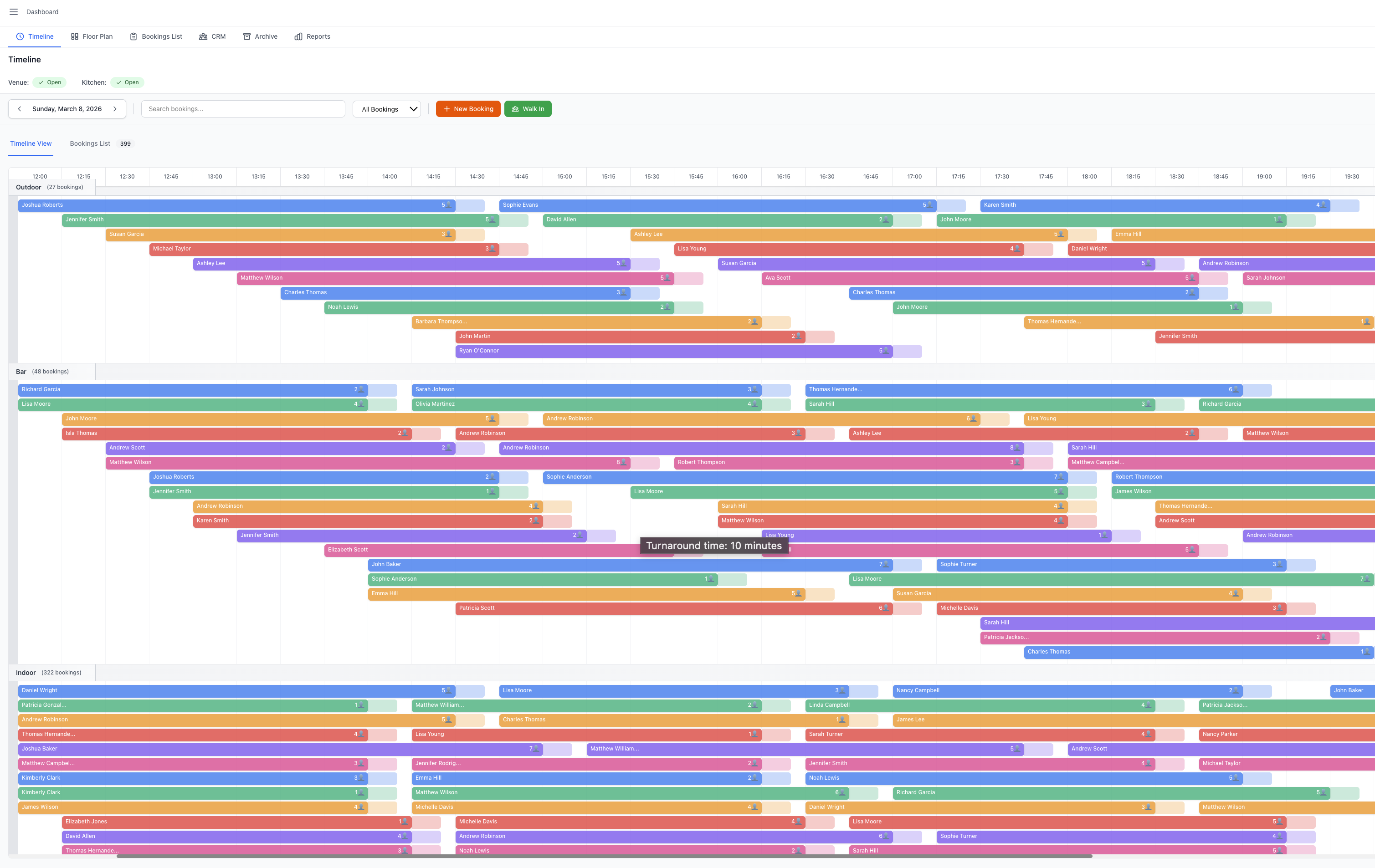
Accept Reservations From Multiple Channels:
- Direct Grab A Table Page: Your custom booking URL
- Website API Integration: Embedded on your site
- Phone Bookings: Manual entry by staff
- Walk-Ins: Same-day entries
- Waitlist Conversions: When tables become available
Track Performance:
- See which sources generate most bookings
- Analyze conversion rates
- Optimize marketing spend
- Identify growth opportunities
Special Request Handling
Deliver Personalized Service:
Common Requests:
- Dietary requirements (vegetarian, vegan, allergies)
- Accessibility needs
- Seating preferences (window, quiet, near kitchen)
- Special occasions (birthday, anniversary)
- High chairs or booster seats
- Specific table requests
How It Works:
- Guests add requests during booking
- Displayed prominently in reservation details
- Staff can add internal notes
- Flagged on timeline view
- Prepare before guest arrives
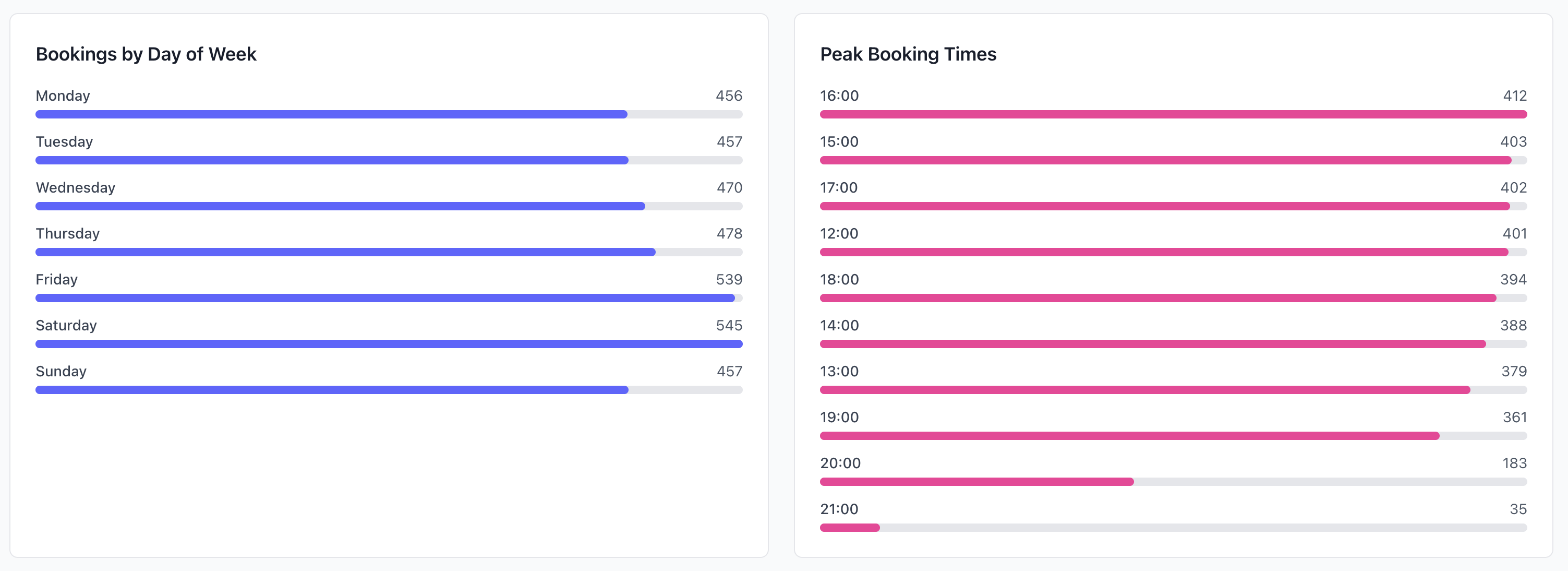
Timeline View
See Everything at a Glance
Visualize your entire day's reservations in chronological order with our intuitive timeline view.
What You See:
- Upcoming reservations displayed chronologically
- Current time indicator
- Color-coded booking statuses
- Party size indicators
- Special request flags
- Table assignment labels
- Time until next reservation
Plan Capacity Efficiently
Optimize Your Service:
Identify Patterns:
- Spot busy periods at a glance
- See gaps in bookings
- Plan double-seating opportunities
- Identify slow periods
- Prepare for rushes
Operational Benefits:
- Plan staff requirements
- Prepare kitchen for volume
- Optimize table turnover
- Manage walk-in capacity
- Handle large parties effectively
Quick Actions from Timeline:
- Click to view full details
- Drag to modify times
- Assign tables visually
- Mark guests as seated
- Complete reservations
Color-Coded Status
Instant Visual Recognition:
- Blue: Confirmed reservation
- Green: Seated and in progress
- Grey: Completed
- Orange: Pending confirmation
- Red: Special attention needed
- Yellow: Special requests
Filters & Views:
- Filter by booking area
- Show/hide completed
- Focus on pending
- View specific times
- Jump to current time
Learn about viewing reservations →
Visualize Floor Plans
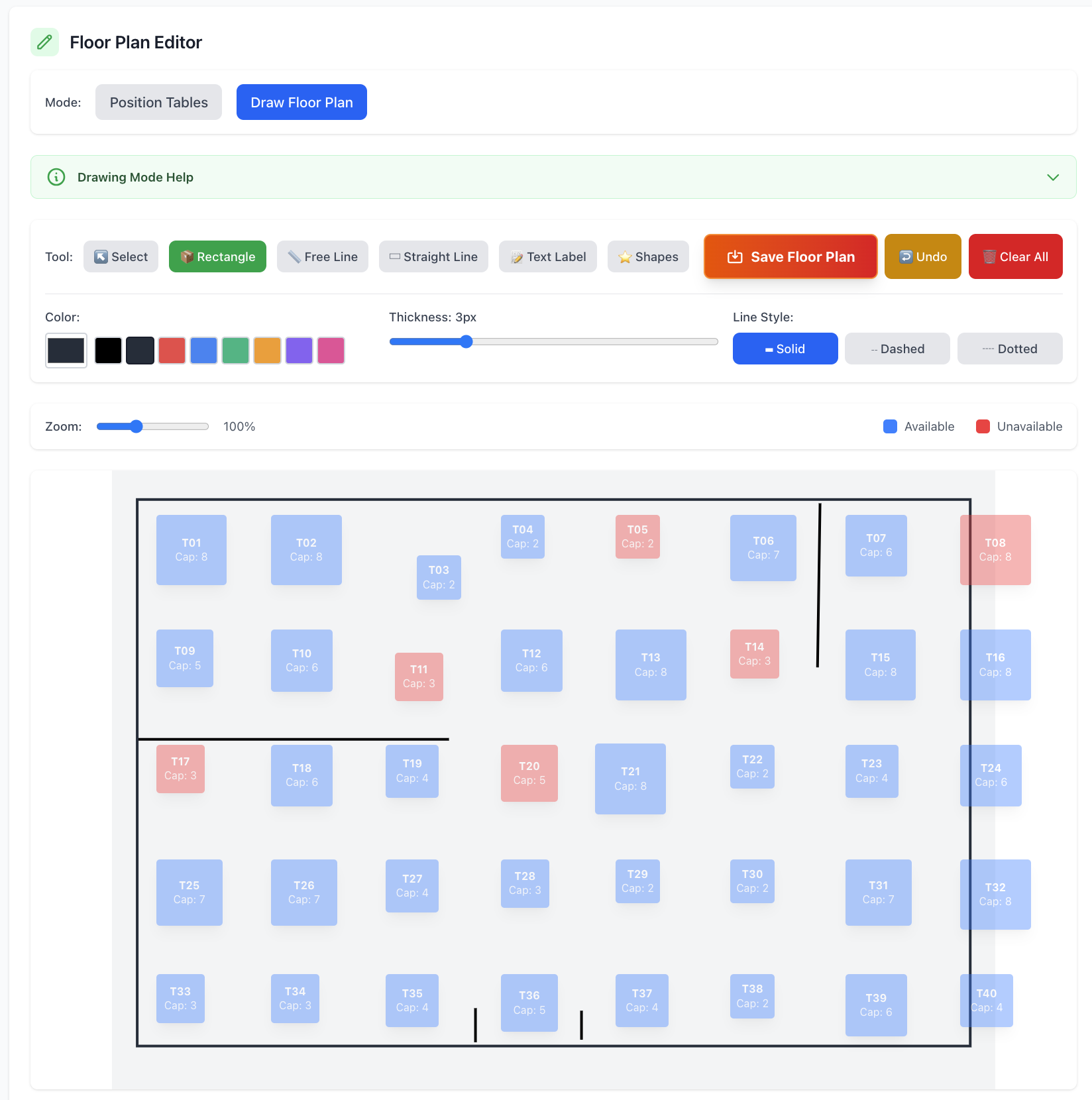
Interactive Floor Plan Designer
Map your entire venue layout and manage tables visually with drag-and-drop simplicity.
Create Your Space:
- Map your entire venue layout
- Add unlimited tables
- Create multiple booking areas (indoor, outdoor, bar, private)
- Drag and drop positioning
- Set table capacities
- Custom table shapes (round, square, rectangle)
- Add barriers and features
Multiple Booking Areas
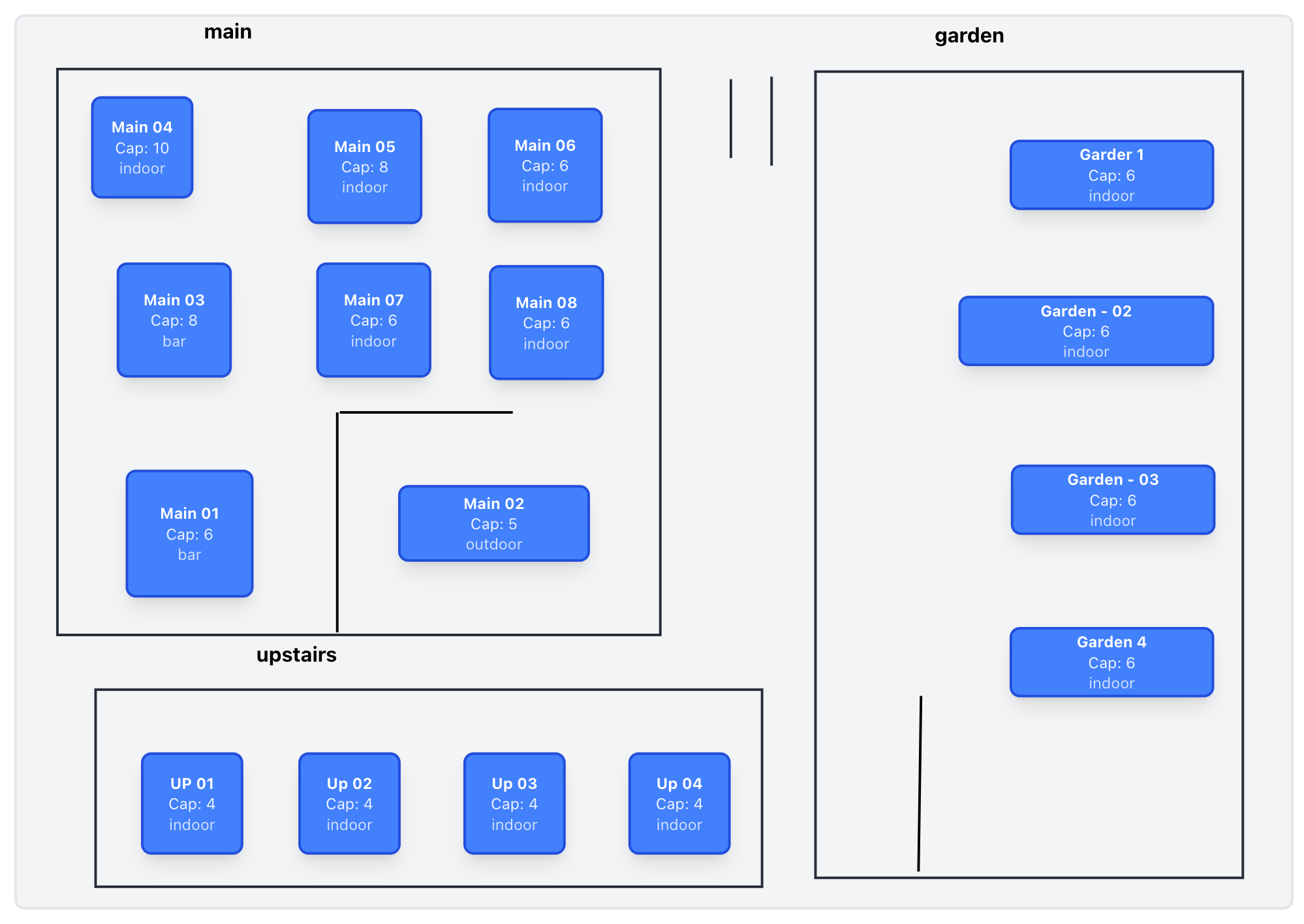
Organize Complex Venues:
Common Areas:
- Main dining room
- Outdoor terrace/patio
- Bar/lounge seating
- Private dining rooms
- Conservatory
- Garden areas
Area-Specific Settings:
- Different booking windows
- Separate capacity limits
- Weather-dependent availability
- Access restrictions
- Turn time rules
Benefits:
- Organize large or multi-level venues
- Manage indoor/outdoor split
- Handle weather changes
- Control VIP sections
- Optimize utilization
Real-Time Table Status
See What's Happening Now:
Status Indicators:
- Available: Ready for booking
- Reserved: Upcoming reservation
- Occupied: Currently seated
- Blocked: Unavailable (maintenance, VIP, etc.)
- Turning: Cleaning/preparing for next guest
Visual Information:
- Which tables are occupied
- Upcoming reservations per table
- Time until next booking
- Party size and duration
- Available capacity
- Double-seating opportunities

Table Management
Configure Every Detail:
Table Properties:
- Table name/number
- Seating capacity (min/max)
- Table shape
- Position on floor plan
- Booking area
- Turn time
- Special attributes (window seat, accessible, etc.)
Advanced Features:
- Combine Tables: Join tables for large parties
- Block Tables: Temporarily unavailable
- Reserve Tables: VIP or regular guests
- Priority Tables: Premium seating
- Table Associations: "Also reserve nearby tables"
Optimize Assignments:
- Suggest best table for party size
- Avoid over/under-seating
- Balance room utilization
- Handle special requests
- Maximize revenue per table

Reduce No-Shows
Automated Communication
Dramatically reduce no-shows with intelligent, automated guest communication.
Communication Types:
1. Booking Confirmation
- Sent immediately after booking
- Includes all details
- Modification/cancellation links
- Add to calendar option
2. Initial Reminder (48 hours)
- 2 days before reservation
- Confirm attendance
- Modify if needed
- One-click confirmation
3. Final Reminder (24 hours)
- Day before reservation
- Last chance to cancel
- Preparation reminder
- Driving directions
4. Day-Of Reminder (optional)
- Morning of reservation
- Looking forward message
- Final details
- Contact information
5. Cancellation Confirmation
- Immediate acknowledgment
- Booking cancelled
- Invite to rebook
- Professional closure

Communication Channels
Email & SMS Options:
Email (Included):
- Professional branded emails
- Rich formatting
- Links and buttons
- Calendar attachments
- No extra cost
SMS (Optional Add-On):
- Higher open rates
- Instant delivery
- Brief, direct messages
- Perfect for last-minute
- Additional cost per message
Customize Messages:
- Personalize content
- Add venue branding
- Include special offers
- Adjust timing
- Set frequency
Configure communication settings →
No-Show Management
Track and Reduce Non-Attendance:
Tracking Features:
- Flag no-shows automatically
- Track no-show rates per customer
- Identify repeat offenders
- Monitor trends over time
- Compare to industry benchmarks
Prevention Strategies:
- Require deposits for large parties
- Implement cancellation policies
- Send multiple reminders
- Confirm day-of
- Block repeat offenders
Recovery Actions:
- Automatically inform waitlist
- Fill cancelled slots quickly
- Track lost revenue
- Analyze patterns
- Adjust policies

Results You Can Expect:
- Up to 80% reduction in no-shows
- Better capacity planning
- Increased revenue
- Improved customer attendance
- More predictable service
Availability management
Control Your Bookings
Fine-tune when and how customers can book to optimize operations.
Booking Windows:
- Set advance booking period (e.g., 30 days ahead)
- Minimum advance notice (e.g., 2 hours)
- Same-day booking cutoff
- Last-minute booking rules
- Different rules per day
Capacity Limits:
- Maximum covers per service
- Covers per time slot
- Party size limits
- Minimum party sizes
- VIP capacity reserves

Block Dates & Special Events
Manage Exceptions:
Block Specific Dates:
- Holidays and closures
- Private events
- Maintenance days
- Staff events
- Emergency closures
Special Event Setup:
- Wedding receptions
- Corporate events
- Prix fixe menus
- Holiday services
- Tasting events
Recurring Closures:
- Weekly day off
- Seasonal closures
- Annual holidays
- Recurring maintenance

Flexible Scheduling
Adapt to Your Business:
Different Rules Per Day:
- Weekday vs weekend capacities
- Longer booking windows for weekends
- Reduced weekday hours
- Special lunch rules
- Different dinner times
Seasonal Adjustments:
- Summer outdoor seating
- Winter capacity reduction
- Holiday season rules
- Festival periods
- Tourist season
Weather-Dependent Areas:
- Auto-disable outdoor in bad weather
- Reduced patio capacity
- Indoor overflow rules
- Real-time adjustments
Override Capabilities:
- Manual overrides anytime
- Emergency adjustments
- Special guest accommodations
- One-time exceptions

Optimize Table Turnover
Maximize Seating Efficiency
Turn Time Configuration:
Set Expected Duration:
- Different times by party size
- Lunch vs dinner times
- Bar/lounge vs dining
- Course-based estimates
- Buffer time between bookings
Smart Scheduling:
- Prevent overbooking
- Allow time for cleaning
- Space out arrivals
- Kitchen flow optimization
- Staff workload balance
Double-Seating:
- Identify opportunities
- Suggest optimal times
- Track success rates
- Maximize revenue
- Maintain service quality

Capacity Utilization
Track How Well You're Using Your Space:
Key Metrics:
- Covers per service
- Tables occupied vs available
- Peak utilization times
- Empty capacity periods
- Average party size revenue
Optimization Strategies:
- Fill slow periods
- Promote off-peak times
- Adjust time slots
- Variable turn times
- Dynamic capacity
Learn about capacity analytics →
Walk-In Management
Handle Spontaneous Guests
Walk-In Features:
Quick Entry:
- Fast booking creation
- Check real-time availability
- Assign immediately
- No customer account needed
- Track as walk-in source
Queue Management:
- Virtual waitlist
- Estimated wait times
- SMS when ready
- Priority handling
- Cancel if they leave
Optimize Mix:
- Reserve some tables for walk-ins
- Balance bookings vs walk-ins
- Capture spontaneous revenue
- Build local following

Integration with Other Systems
Seamless Connections
POS Integration:
- Link reservations to transactions
- Track spend per booking
- Guest value analysis
- Loyalty program sync
- All-in-one operations
Website Booking Widget:
- Embed on your site
- Real-time availability
- Branded experience
- Mobile responsive
- Easy integration
API Access:
- Custom integrations
- Build your own tools
- Connect third parties
- Webhook notifications
- Developer-friendly

Best Practices
Maximize Your Reservation System
Daily Operations:
- Check timeline view each morning
- Confirm pending bookings promptly
- Review special requests
- Adjust table assignments
- Monitor for no-shows
Weekly Review:
- Analyze no-show trends
- Review capacity utilization
- Adjust booking windows
- Update floor plan if needed
- Train staff on new features
Monthly Optimization:
- Review analytics
- Adjust peak time rules
- Update turn times
- Refine communication
- Evaluate policies

Common Mistakes to Avoid
Don't:
- Ignore pending confirmations
- Forget to assign tables
- Miss special requests
- Overlook no-show patterns
- Neglect floor plan accuracy
Do:
- Respond quickly to bookings
- Keep floor plan updated
- Monitor timeline regularly
- Adjust for seasonality
- Train staff thoroughly
Next Steps
Learn More
- Staff & Operations - Manage your team and daily operations
- Analytics & Growth - Track performance and grow revenue
- Venue Owners Overview - Back to main overview
Get Started Guides
- Managing Reservations - Daily booking operations
- Floor Plan Setup - Design your venue
- Availability Settings - Configure booking rules
- Reservation Settings - Fine-tune your system
Support Resources
- FAQ for Venue Owners - Common questions
- Troubleshooting - Fix common issues
- Contact Support - Get help

Questions?
Get Help:
- Email: [email protected]
- WhatsApp: Message us
- Documentation: Browse all guides
Master your reservations and capacity to maximize revenue and deliver exceptional guest experiences.