
Appearance
Archive
Access historical bookings and past data.
Overview
The Archive stores all historical booking data, allowing you to search past reservations, review customer history, analyze trends, and retrieve information. Essential for reporting, customer service, and business analysis.
Accessing Archive
Navigate to Venue Operations > Archive
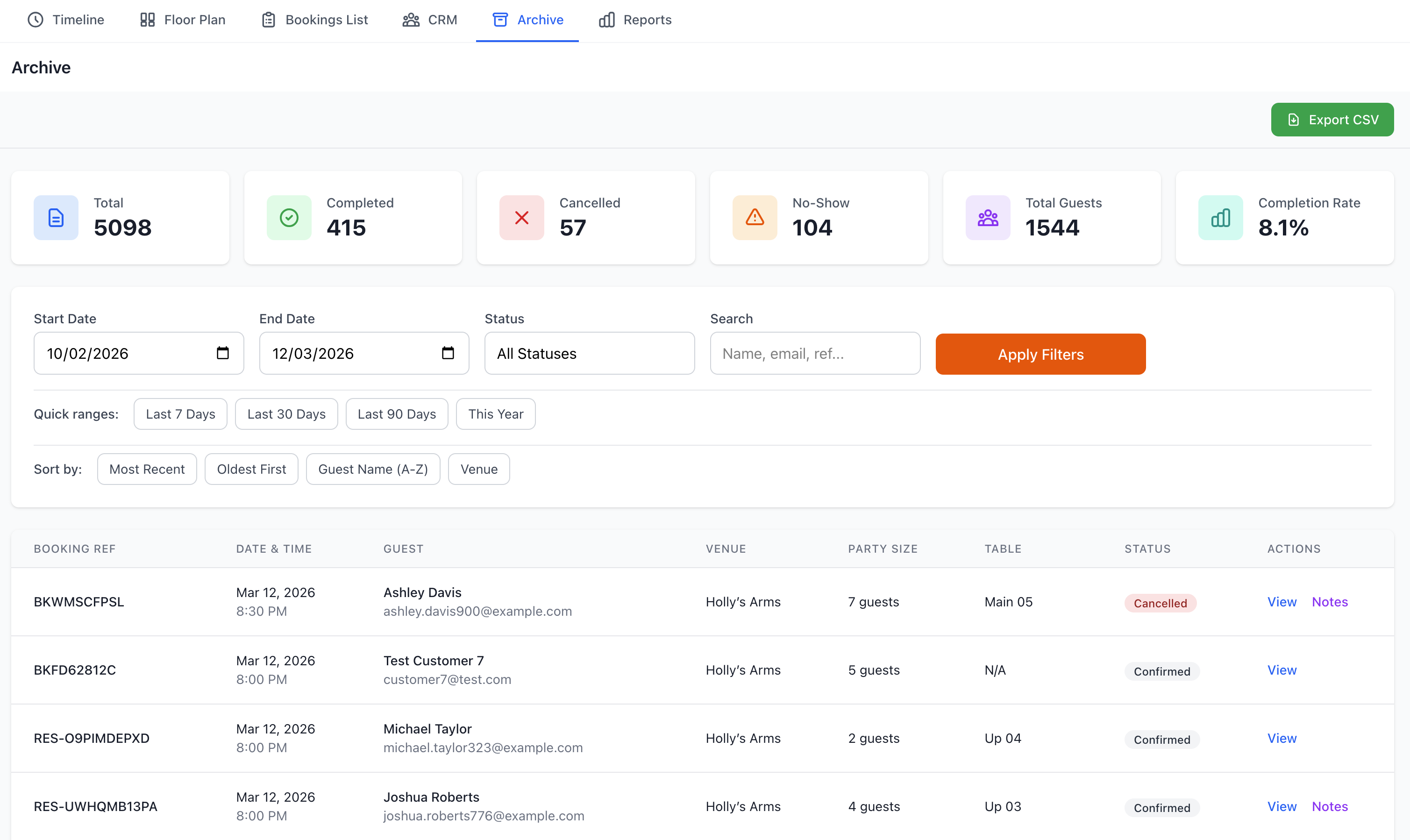
Viewing Archived Data
Date Range Selection
Quick Ranges
- Last 7 days
- Last 30 days
- Last 3 months
- Last 6 months
- Last year
- All time
- Custom range
Custom Date Range
- Select start date
- Select end date
- Apply filter
- View results
Archive Display
Information Shown
- Booking date and time
- Guest name
- Party size
- Table assigned
- Booking status
- Source
- Revenue
- Notes
- Completion status
Sort Options
- By date (newest/oldest)
- By guest name
- By party size
- By revenue
- By status
- By table
Searching Archives
Quick Search
Find historical bookings:
Search By
- Guest name
- Phone number
- Email address
- Booking reference
- Confirmation code
- Table number
- Date
Search Tips
- Partial matches work
- Not case-sensitive
- Search across all fields
- Real-time results
Advanced Search
Detailed archive queries:
Search Criteria
- Date ranges
- Status types
- Revenue ranges
- Party size ranges
- Booking sources
- Table assignments
- Tags/categories
- Custom fields
Combining Filters
- Multiple criteria
- AND/OR logic
- Include/exclude
- Complex queries
- Save searches
Filtering Archives
Status Filters
Filter by completion:
- Completed - Successful bookings
- Cancelled - Cancelled by guest/venue
- No-Shows - Guest didn't arrive
- Seated - Was seated (historical)
- All - Everything
Source Filters
By booking origin:
- Online bookings
- Phone reservations
- Walk-ins
- Partner platforms
- API bookings
- Manual entries
- Import sources
Financial Filters
By revenue:
- With deposits
- Payment completed
- Refunded bookings
- Disputed charges
- Revenue range
- Above/below amount
- Zero revenue
Customer History
Guest Archive
View customer's past visits:
Access Customer Archive
- Search for customer
- Click customer name
- View Visit History
- See all past bookings
History Details
- All past bookings
- Visit dates
- Party sizes
- Tables used
- Revenue per visit
- Special requests
- Service notes
- Trends and patterns
Visit Analysis
Analyze customer behavior:
Metrics Shown
- Total visits
- First visit date
- Last visit date
- Average party size
- Preferred days/times
- Favorite tables
- Average spend
- Visit frequency
- Seasonal patterns
Reports from Archive
Historical Reports
Generate archive reports:
Standard Reports
- Revenue by period
- Booking volume
- No-show analysis
- Cancellation rate
- Source performance
- Table utilization
- Peak times
- Customer retention
Custom Reports
- Select date range
- Choose metrics
- Apply filters
- Group by criteria
- Generate report
- Export data
Comparative Analysis
Compare periods:
Comparison Types
- Year-over-year
- Month-over-month
- Week-over-week
- Day-of-week
- Service periods
- Seasonal trends
Metrics Compared
- Booking volumes
- Revenue
- Average party size
- No-show rates
- Customer acquisition
- Table turnover
Exporting Archive Data
Export Options
Download historical data:
File Formats
- Excel (.xlsx)
- CSV (.csv)
- PDF report
- JSON data
- XML format
Export Settings
- Select date range
- Choose fields
- Apply filters
- Select format
- Download
Export Uses
Common Scenarios
- Annual reporting
- Tax records
- Financial analysis
- Marketing analysis
- Customer insights
- Compliance records
- Backup data
- Migration
Data Retention
Retention Policies
How long data is kept:
Active Bookings
- Current and future
- Immediate access
- Full functionality
- Real-time updates
Recent Archive
- Last 12 months
- Quick access
- Full details
- Searchable
Historical Archive
- 1-7 years
- Slower access
- Essential details
- Compliance period
Legal Requirements
- Tax records: 7 years
- Financial: 7 years
- Customer data: As required
- GDPR compliance
- Local regulations
Archiving Process
Automatic Archiving
- Completed bookings
- After defined period
- Canceled bookings
- No-shows
- Scheduled process
Manual Archiving
- Bulk operations
- Special cases
- Data cleanup
- Migration prep
Retrieving Information
Restoration
Retrieve archived data:
View Only
- Access details
- Print records
- Copy information
- Reference data
Cannot Modify
- Archived records locked
- Historical accuracy
- Audit compliance
- Data integrity
Customer Inquiries
Handle customer requests:
Common Requests
- Past visit confirmation
- Receipt copies
- Booking details
- Cancellation records
- Refund history
- Loyalty points
Process
- Search archives
- Locate booking
- Verify customer
- Provide information
- Document request
Compliance & Records
Legal Compliance
Meeting requirements:
Financial Records
- Transaction history
- Payment records
- Refunds processed
- Deposit tracking
- Tax documentation
Customer Data
- Booking history
- Contact information
- Communication records
- Consent tracking
- Privacy compliance
Business Records
- Operational data
- Performance metrics
- Staff records
- Audit trails
- Incident reports
Data Access Rights
Customer rights (GDPR):
Right to Access
- Request their data
- Provide within 30 days
- Free of charge
- Complete records
- Clear format
Right to Erasure
- Delete personal data
- Exceptions apply
- Financial records remain
- Anonymize data
- Document request
Right to Portability
- Export their data
- Machine-readable format
- Transfer to another service
- Upon request
Analytics from Archive
Trend Analysis
Identify patterns:
Booking Trends
- Volume over time
- Seasonal patterns
- Growth rates
- Decline periods
- Recovery trends
Customer Trends
- New vs returning
- Retention rates
- Loyalty patterns
- Lifetime value
- Churn analysis
Revenue Trends
- Sales over time
- Average booking value
- Revenue sources
- Profitability
- Forecasting
Performance Metrics
Historical performance:
Operational Metrics
- Table utilization
- Turn times
- No-show rates
- Cancellation rates
- Staff efficiency
Customer Metrics
- Satisfaction trends
- Review patterns
- Complaint frequency
- Resolution rates
- Loyalty growth
Benchmarking
Compare performance:
Internal Benchmarks
- Best periods
- Target metrics
- Goals vs actuals
- Improvement areas
- Success factors
Year-over-Year
- Growth rates
- Performance changes
- Seasonal adjustments
- Market trends
- Business evolution
Best Practices
Archive Management
- Regular Reviews - Periodic analysis
- Data Quality - Maintain accuracy
- Compliance - Meet requirements
- Accessibility - Easy retrieval
- Organization - Logical structure
Using Historical Data
- Learn from Past - Identify patterns
- Improve Operations - Data-driven decisions
- Forecast Future - Predictive planning
- Customer Service - Quick resolution
- Business Growth - Strategic insights
Data Security
- Access Control - Limited permissions
- Backup Systems - Regular backups
- Encryption - Secure storage
- Audit Logs - Track access
- Compliance - Meet regulations
Troubleshooting
Can't Find Booking
If booking not in archive:
- Check date range
- Verify filters
- Try different search terms
- Check spelling
- Search by multiple fields
- Contact support if needed
Slow Search
Performance issues:
- Narrow date range
- Use specific filters
- Limit results shown
- Clear browser cache
- Check internet speed
- Try off-peak times
Export Failing
Download problems:
- Reduce date range
- Fewer records
- Different format
- Check permissions
- Disable popup blocker
- Try again later
Missing Data
If data appears incomplete:
- Verify data was entered
- Check retention period
- Review migration records
- Check archive date
- Contact support
- Request data recovery
Support
Need help with Archive?
- Email: [email protected]
- WhatsApp: WhatsApp Support
Related Pages
- Bookings List - Current bookings
- Reports - Detailed analytics
- CRM - Customer management
Data Retention
Archived data is kept according to legal requirements. Some data cannot be deleted until retention periods expire.