Appearance
Licences
Manage your Grab A Table licences for each venue.
Overview
Each venue requires an active licence to use the Grab A Table platform. This page explains how licences work, how to purchase them, and how to manage them across your venues.
Pricing
Simple, Transparent Pricing
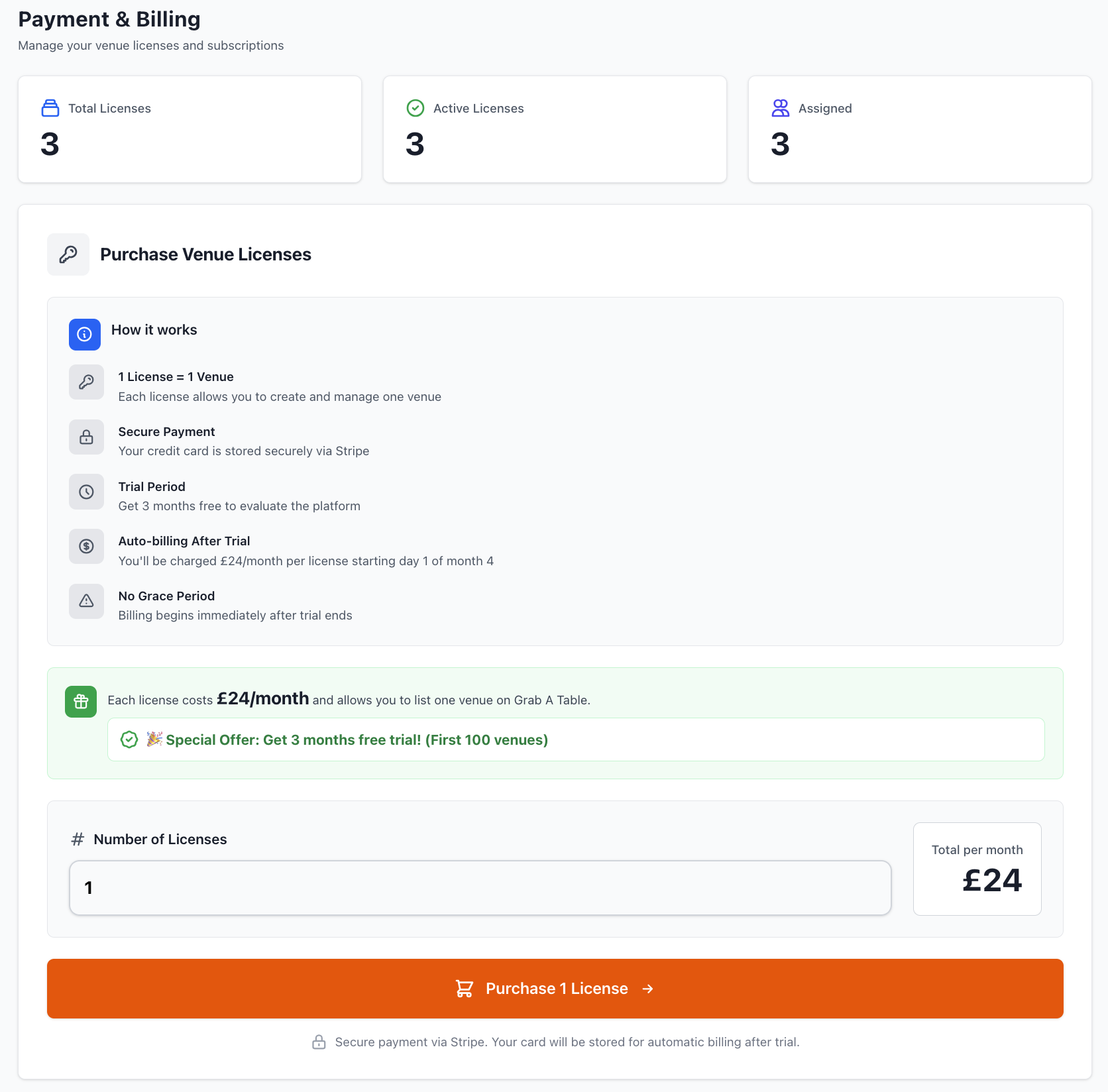
£24 per venue per month (ex. VAT)
- No setup fees
- No hidden costs
- No per-booking charges
- All features included
- No upgrades needed
Special Offer
First 100 customers get 3 months completely free!
What's Included
Every licence includes:
✓ Unlimited Bookings - No per-booking fees ✓ Unlimited Staff Accounts - Add as many team members as needed ✓ All Features - Every feature at no extra cost ✓ 24/7 Online Booking - Accept reservations anytime ✓ Table Management - Full seating control ✓ Staff Rota - Shift scheduling and management ✓ Analytics & Reports - Performance tracking ✓ Customer Communications - Automated emails and SMS ✓ Waitlist Management - Handle walk-ins efficiently ✓ Private Events - Event booking management ✓ API Access - Integration capabilities ✓ Support - Email, phone, and WhatsApp support
Managing Licences
Viewing Your Licences
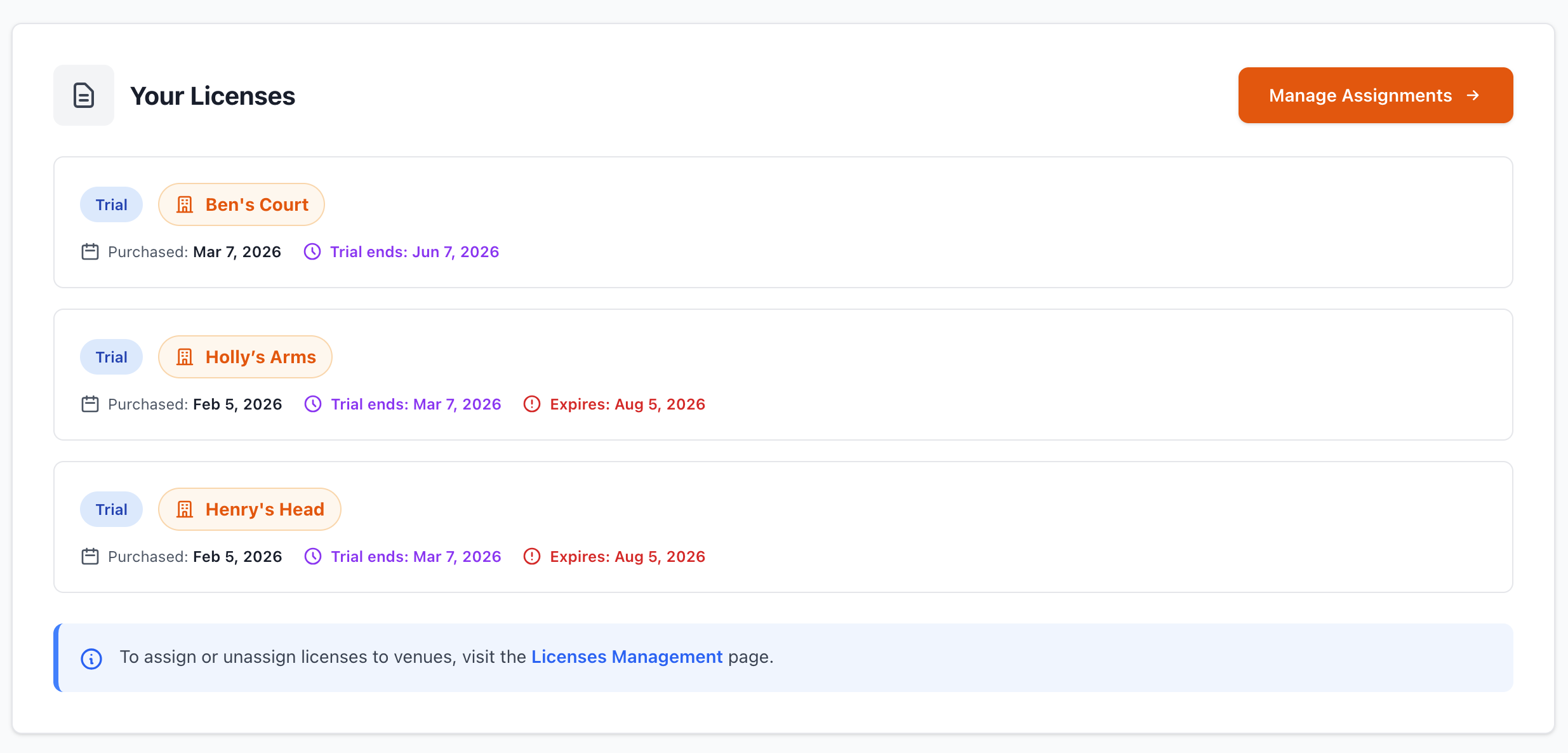
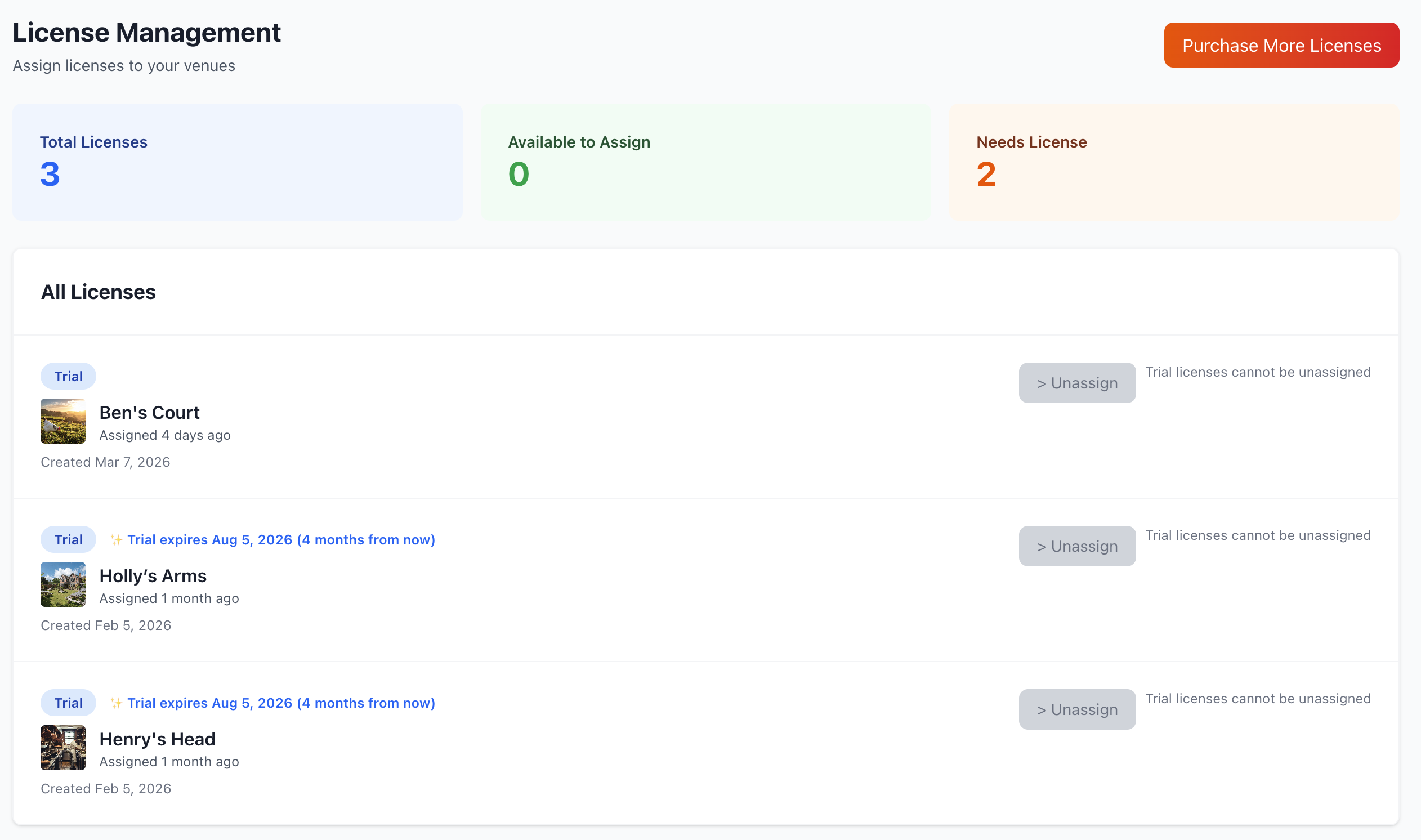
Navigate to Venue Management > Licences to see:
- Active Licences - Currently active venues
- Licence Status - Active, Trial, Expired, Paused
- Next Billing Date - When renewal occurs
- Payment Method - Current payment details
- Billing History - Past invoices and payments
Licence Details
For each licence, you can view:
- Venue name and location
- Licence start date
- Current billing period
- Auto-renewal status
- Trial information (if applicable)
- Payment history
Purchasing Licences
For Your First Venue
When you register:
- Create your account
- Add your first venue details
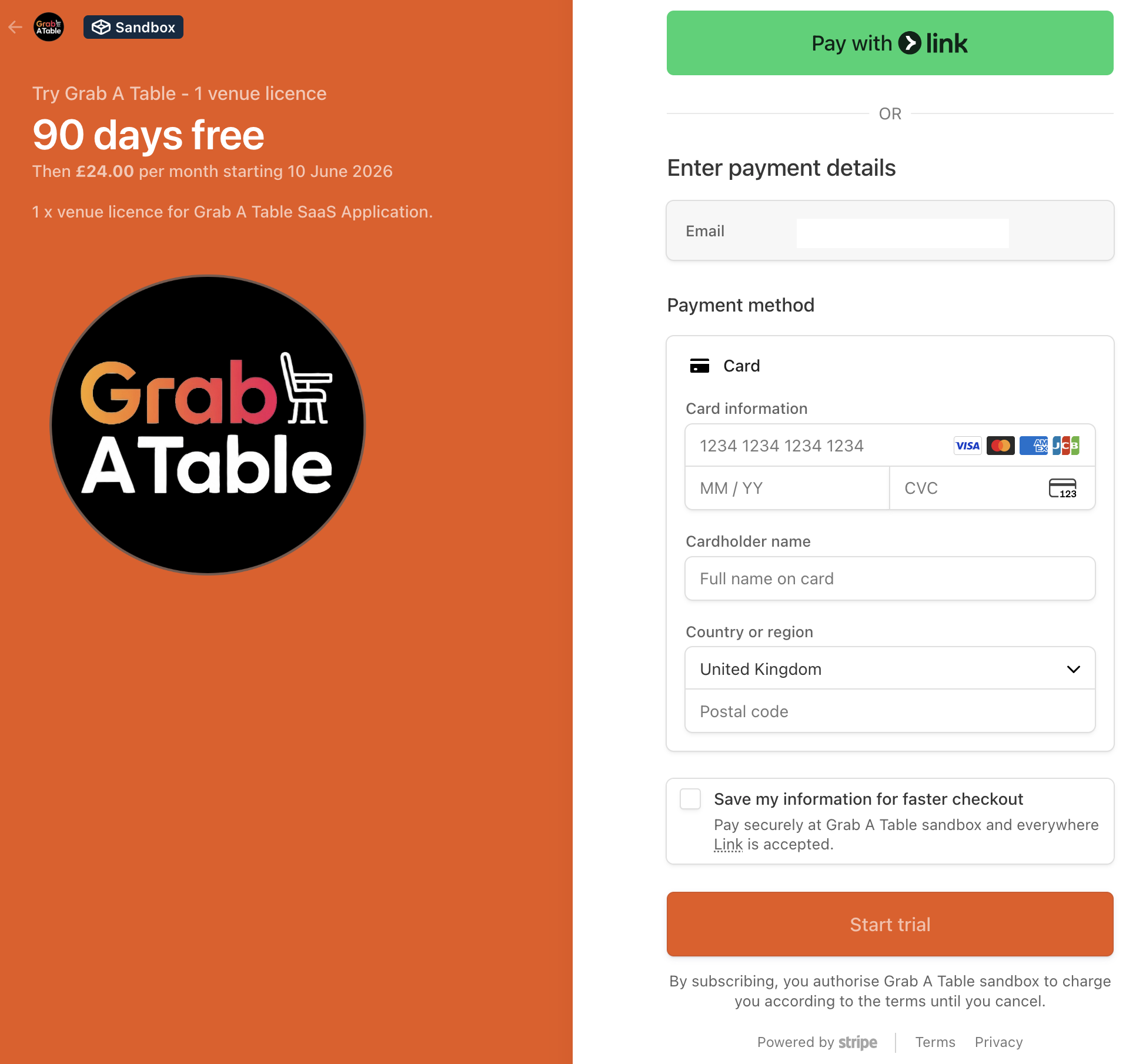
- Enter payment information
- Start your free trial (first 100 customers get 3 months)
- Begin taking bookings immediately
Adding Additional Venues
To purchase a licence for another venue:
- Go to All Venues > Add New Venue
- Complete venue setup
- Add payment method (if not already on file)
- Activate licence
- Start using the platform
TIP
Each venue requires its own licence at £24/month (ex. VAT).
Billing & Payments
Payment Methods
Accepted payment methods:
- Credit/Debit Card (Visa, Mastercard, Amex)
- Direct Debit (UK only)
- Business Account
Billing Cycle
- Monthly Billing - Charged on the same date each month
- Pro-Rata Charges - First partial month calculated proportionally
- Auto-Renewal - Automatically renews unless cancelled
- Grace Period - 7 days to update payment if charge fails
Invoices
Access your invoices:
- Go to Licences page
- Click Billing History
- Download PDF invoices
- View payment receipts
- Export for accounting
VAT
- All prices shown exclude VAT
- VAT is added at checkout (20% for UK customers)
- VAT invoices automatically generated
- VAT number can be added to account
Trial Period
3-Month Free Trial
First 100 customers receive:
- 1 month standard trial
- + 2 months early adopter bonus
- = 3 months completely free
Trial Benefits
During your trial:
- Full access to all features
- No credit card required (first 30 days)
- No automatic charges
- Cancel anytime with no fees
- Bookings and data remain yours
After Trial Ends
When your trial ends:
- Standard pricing begins (£24/month/venue ex. VAT)
- Billing starts automatically if payment method on file
- Can pause or cancel before trial ends
- All data is preserved
Managing Active Licences
Pausing a Licence
To temporarily pause a venue:
- Go to Licences page
- Select the venue
- Click Pause Licence
- Confirm pause period
- Billing stops during pause
WARNING
Pausing a licence disables bookings and hides the venue from public listings.
Cancelling a Licence
To cancel a venue licence:
- Go to Licences page
- Select the venue
- Click Cancel Licence
- Provide feedback (optional)
- Confirm cancellation
What happens when you cancel:
- Access continues until end of current billing period
- No further charges
- Venue removed from public listings
- Data retained for 90 days
- Can reactivate within 90 days
Reactivating a Licence
To reactivate a cancelled venue:
- Go to Licences page
- Find the inactive venue
- Click Reactivate
- Confirm payment details
- Venue goes live immediately
Multi-Venue Discounts
Volume Pricing
Currently, our pricing is the same for all customers:
- £24 per venue per month (ex. VAT)
We're exploring volume discounts for customers with multiple venues. Contact our team at [email protected] to discuss options.
Billing Issues
Payment Failed
If a payment fails:
- Email Notification - You'll be notified immediately
- Update Payment Method - Add a new card or fix existing one
- Retry - Payment automatically retried after 3 days
- Grace Period - 7 days to resolve before service affected
- Service Suspension - After 7 days, venue paused until resolved
Updating Payment Method
To update your payment details:
- Go to Licences > Payment Methods
- Click Add New Payment Method
- Enter card details
- Click Set as Default
- Remove old payment method (optional)
Disputed Charges
If you believe you've been charged incorrectly:
- Contact support immediately
- Provide transaction details
- Explain the issue
- We'll investigate and resolve within 3-5 business days
Refunds & Credits
Refund Policy
- Trial Period - Full refund if cancelled within first 30 days
- Monthly Subscription - Pro-rata refund for unused time at our discretion
- Annual Plans - Contact support to discuss options
Service Credits
Credits may be issued for:
- Platform downtime (>2 hours)
- Billing errors
- Service issues
Credits are applied to your next invoice.
FAQ
Can I switch between monthly and annual billing?
Currently, we offer monthly billing only. Annual plans are coming soon.
What happens to my data if I cancel?
Your data is retained for 90 days after cancellation. After 90 days, it's permanently deleted unless you reactivate.
Can I transfer a licence to another venue?
Licences are venue-specific and cannot be transferred. You'll need to cancel one licence and purchase another.
Do you offer non-profit discounts?
Contact us at [email protected] to discuss special pricing for registered non-profits and charities.
What if I need to change my registered business details?
Email [email protected] with your new business information and we'll update your account.
Support
Questions about licences or billing?
- Email: [email protected]
- Support: [email protected]
- WhatsApp: WhatsApp Support
Related Pages
- All Venues - Manage your venues
- Venue Management - Configure venue settings
- Global Settings - Account-wide settings
Start Your Free Trial
Join the first 100 customers and get 3 months completely free! Register now