Appearance
Staff
Manage your team members, roles, and workforce.
Overview
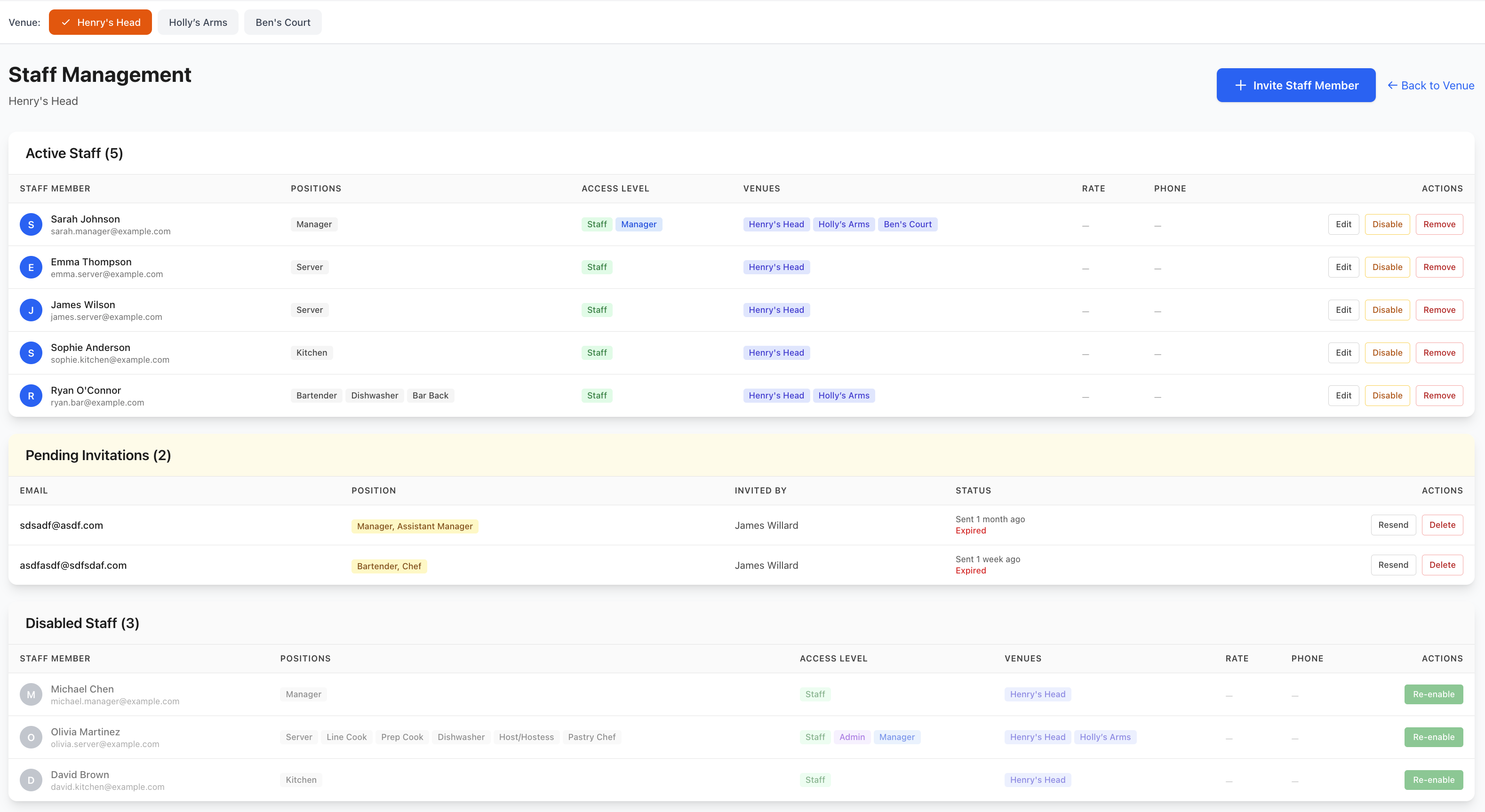
The Staff section provides complete workforce management. Add team members, define roles, track qualifications, manage availability, monitor performance, and maintain all employee information.
Accessing Staff Management
Navigate to Rotas & Staff > Staff
Staff Directory
Viewing All Staff
Complete team overview:
Staff List Display
- Staff photo
- Full name
- Role/position
- Employment type
- Contact information
- Current status
- Quick actions
List Views
- All staff (default)
- Active staff
- Inactive staff
- By venue
- By department
- By role
- Custom filters
Staff Cards
Individual staff cards show:
Key Information
- Profile photo
- Name and role
- Employee ID
- Department/venue
- Contact details
- Employment dates
- Current status
Quick Stats
- Hours this week
- Upcoming shifts
- Attendance rate
- Performance rating
- Last shift date
Quick Actions
- Edit profile
- Assign shift
- Send message
- View schedule
- Performance review
Adding New Staff
Create Staff Profile
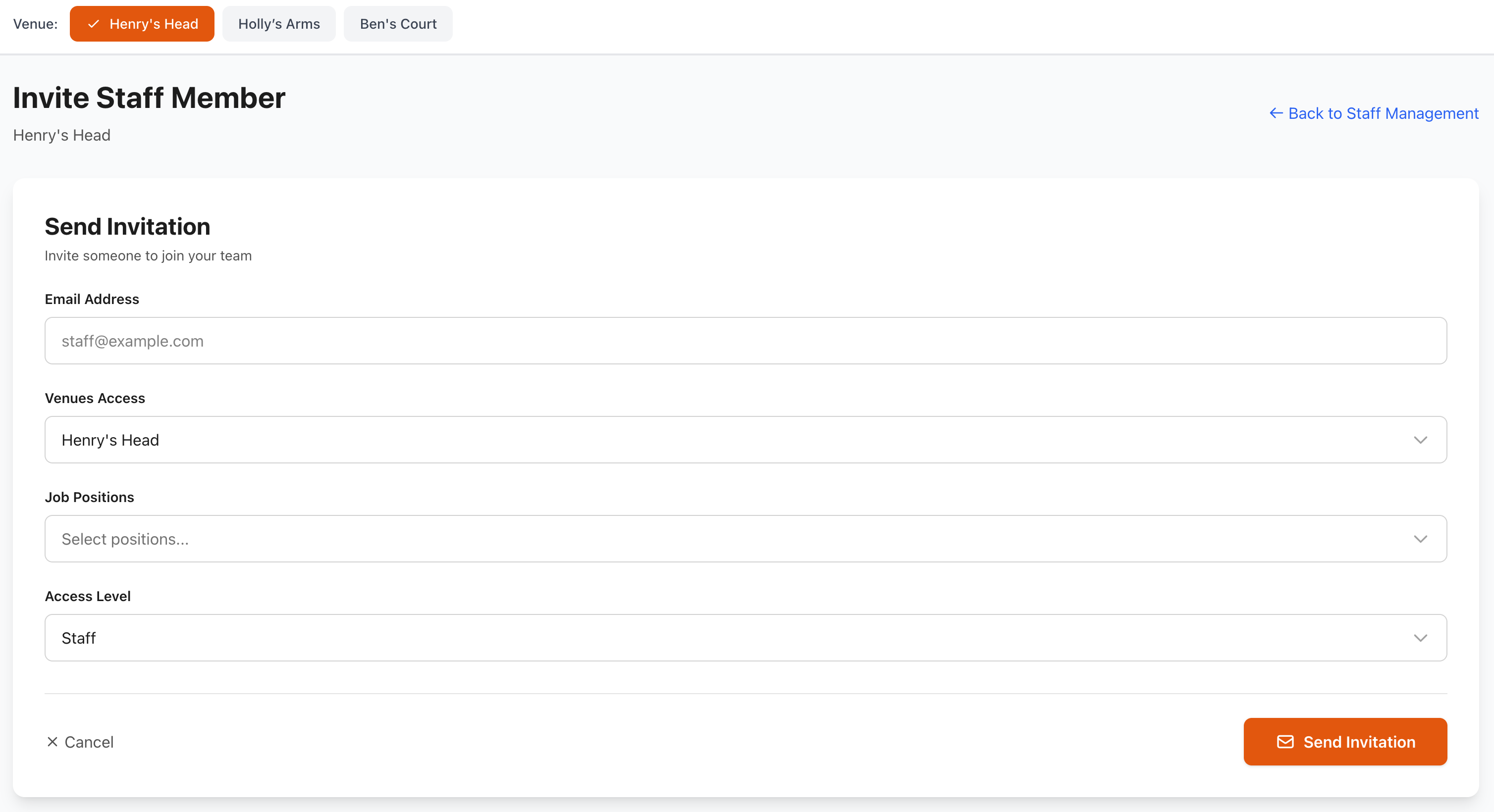
Add team members:
- Click Add Staff or +
- Enter staff details
- Upload photo (optional)
- Configure settings
- Set permissions
- Save profile
Basic Information
Personal Details
- First name
- Last name
- Date of birth
- Gender (optional)
- Profile photo
- Emergency contact
Contact Information
- Email address
- Mobile phone
- Home phone (optional)
- Address
- Postal code
- Country
Employment Details
- Job title/role
- Department
- Venue(s)
- Start date
- Employment type
- Employee ID
- Manager/supervisor
Employment Types
Full-Time
- Regular contracted hours
- Typically 35-40 hours/week
- Standard benefits
- Predictable schedule
Part-Time
- Reduced contracted hours
- Set weekly hours
- Pro-rata benefits
- Regular pattern
Casual
- Variable hours
- No guaranteed hours
- Flexible availability
- On-demand basis
Contract
- Fixed-term contract
- Specific duration
- Project-based
- End date specified
Temporary
- Short-term assignment
- Cover absence
- Seasonal work
- Trial period
Roles & Positions
Defining Roles
Set job positions:
Front-of-House Roles
- Manager
- Assistant Manager
- Head Waiter/Waitress
- Waiter/Waitress
- Host/Hostess
- Bartender
- Bar Back
- Sommelier
Back-of-House Roles
- Head Chef
- Sous Chef
- Chef de Partie
- Commis Chef
- Kitchen Porter
- Dishwasher
- Prep Cook
Support Roles
- Cleaner
- Maintenance
- Security
- Administrator
- Marketing
Role Configuration
For each role, define:
Requirements
- Minimum age
- Required qualifications
- Necessary certifications
- Experience level
- Skills needed
- Training completed
Permissions
- System access level
- Schedule visibility
- Booking access
- Reporting access
- Management functions
- Settings access
Pay Rate
- Base hourly rate
- Overtime rate
- Weekend rate (if different)
- Holiday rate
- Tips/service charge
- Bonuses
Multi-Role Staff
Staff with multiple positions:
- Primary role (main position)
- Secondary roles
- Different pay rates per role
- Scheduling flexibility
- Cross-training benefits
- Increased utility
Pay & Compensation
Setting Pay Rates
Configure compensation:
Hourly Rate
- Standard rate
- Minimum wage compliance
- Market rate consideration
- Experience-based
- Regular reviews
Overtime Rates
- Time-and-a-half (1.5x)
- Double-time (2x)
- After X hours (e.g., 40/week)
- Weekend rates
- Holiday rates
Additional Pay
- Tips/service charge
- Bonuses
- Allowances
- Commission
- Shift differentials
- Travel expenses
Pay Rate History
Track changes:
- Date changed
- Previous rate
- New rate
- Change reason
- Approved by
- Effective date
Qualifications & Certifications
Required Certifications
Track mandatory credentials:
Common Requirements
- Food Safety/Hygiene
- Responsible Service of Alcohol (RSA)
- First Aid
- Fire Safety
- Allergen Training
- Barista License
Document Management
- Upload certificates
- Set expiry dates
- Automatic reminders
- Renewal tracking
- Compliance monitoring
Skills & Training
Record competencies:
Skill Categories
- Technical skills
- Customer service
- Languages spoken
- Special abilities
- Equipment operation
- Software proficiency
Training History
- Course name
- Date completed
- Trainer/provider
- Certification earned
- Next renewal date
- Training documents
Compliance Tracking
Ensure legal compliance:
Alerts for:
- Expiring certifications
- Missing qualifications
- Overdue training
- Legal requirements
- Renewal deadlines
- Non-compliant scheduling
Availability Management
Setting Availability
Staff availability patterns:
Regular Availability
- Set weekly pattern
- Recurring schedule
- Preferred days/times
- Unavailable periods
- Maximum hours
Temporary Changes
- Time-off requests
- Holiday periods
- Medical appointments
- Personal commitments
- School schedules (if applicable)
Availability Calendar
Visual availability display:
Status Indicators
- Available (green)
- Unavailable (red)
- Preferred (blue)
- Maybe (amber)
- Already scheduled (grey)
Time-Off Requests
- Request dates
- Reason (optional)
- Approval status
- Manager notes
- Approved/denied
Staff Scheduling
Assigning Shifts
Schedule staff members:
From Staff Profile
- Open staff profile
- Click Assign Shift
- Select date and time
- Choose role
- Set details
- Save shift
Scheduled Shifts View
- Upcoming shifts
- Past shifts
- Total hours
- Shift history
- Attendance record
Shift Preferences
Staff preferences:
Preferred Times
- Morning shifts
- Evening shifts
- Weekend availability
- Flexible
- Specific days only
Maximum Hours
- Weekly hour limit
- Daily hour limit
- Consecutive day limit
- Break preferences
- Overtime willingness
Performance Tracking
Performance Metrics
Monitor staff performance:
Attendance
- On-time percentage
- Late arrivals
- Absences
- No-shows
- Leave taken
Schedule Compliance
- Shifts completed
- Early departures
- Shift swaps
- Overtime hours
Customer Feedback
- Customer ratings
- Compliments received
- Complaints
- Special recognition
- Reviews mentioned
Manager Assessments
- Regular reviews
- Skill progression
- Areas for improvement
- Strengths
- Development goals
Performance Reviews
Conduct formal reviews:
Review Schedule
- Probation review (3 months)
- Annual reviews
- Six-month check-ins
- As needed
Review Components
- Performance discussion
- Goal review
- Skill assessment
- Training needs
- Career development
- Compensation review
- Action plans
Documentation
- Review notes
- Agreed goals
- Development plan
- Sign-off
- Follow-up dates
Staff Status
Employment Status
Track employee status:
Active
- Currently employed
- Scheduled for shifts
- Full system access
- Default status
On Leave
- Temporary absence
- Medical leave
- Parental leave
- Sabbatical
- Return date set
Suspended
- Temporary suspension
- Disciplinary action
- Investigation pending
- Limited access
- Duration specified
Inactive
- Left employment
- No longer scheduled
- Limited system access
- Historical records retained
Archived
- Historical records only
- Completely removed from active system
- Retained for legal/record purposes
Managing Departures
When staff leave:
Exit Process
- Set departure date
- Update status to inactive
- Remove from future schedules
- Process final pay
- Collect company property
- Exit interview (optional)
- Archive records
Access Management
- Revoke system access
- Remove from staff lists
- Maintain historical data
- Update reporting
- Handover responsibilities
Staff Documents
Document Storage
Store employee documents:
Personal Documents
- ID/passport
- Proof of right to work
- Tax forms
- Bank details
- Emergency contacts
- Contract
Employment Documents
- Signed contract
- Job description
- Offer letter
- Policies acknowledged
- NDA/confidentiality
- Handbook receipt
Certifications
- Training certificates
- Professional licenses
- Medical clearances
- Background checks
- References
Performance Documents
- Review notes
- Disciplinary records
- Commendations
- Warning notices
- Development plans
Document Security
Protect sensitive information:
- Encrypted storage
- Access control
- Manager-only access
- Audit logging
- Secure deletion
- GDPR/privacy compliance
Communication
Messaging Staff
Contact team members:
Individual Messages
- Direct email
- SMS/text message
- In-app notification
- Phone call
- WhatsApp message
Bulk Communications
- All staff
- By venue
- By role
- By department
- Custom selection
Message Types
- Schedule notifications
- Policy updates
- Important announcements
- Reminders
- Emergency alerts
Staff Portal
Self-service access:
Staff Can:
- View schedule
- Request time off
- Swap shifts
- Update availability
- Clock in/out
- View pay stubs
- Update personal details
- View documents
- Message management
Reporting
Staff Reports
Generate workforce reports:
Standard Reports
- Staff directory
- Contact list
- Role distribution
- Hours worked
- Labor costs
- Attendance summary
- Performance overview
- Training matrix
- Certification status
Custom Reports
- Choose parameters
- Select fields
- Filter data
- Group results
- Export format
Export Options
Download staff data:
- Excel/CSV
- PDF directory
- Contact cards (vCard)
- Mailing labels
- Custom formats
Best Practices
Effective Staff Management
- Complete Profiles - Maintain accurate information
- Regular Updates - Keep details current
- Document Everything - Training, reviews, issues
- Fair Treatment - Consistent policies
- Open Communication - Regular feedback
Compliance & Legal
- Verify Right to Work - Before employment
- Track Certifications - Ensure current
- Document Policies - Clear expectations
- Privacy Protection - Secure personal data
- Regular Audits - Check compliance
Performance Optimization
- Set Clear Goals - Specific, measurable
- Regular Feedback - Don't wait for reviews
- Recognize Success - Acknowledge achievements
- Address Issues - Promptly and fairly
- Develop Skills - Invest in training
Staff Retention
- Fair Compensation - Competitive rates
- Work-Life Balance - Respect availability
- Career Development - Growth opportunities
- Recognition - Appreciate contributions
- Good Culture - Positive environment
Troubleshooting
Can't Add New Staff
If unable to create profile:
- Check permissions
- Verify email unique
- Complete required fields
- Check staff limit (plan-based)
- Contact support
Staff Not Receiving Notifications
Communication issues:
- Verify contact details
- Check notification settings
- Test email delivery
- Check spam folders
- Verify app installation
Availability Not Updating
If changes not saving:
- Refresh page
- Check internet connection
- Verify permissions
- Clear cache
- Try different browser
Incorrect Pay Calculations
If costs seem wrong:
- Verify hourly rates
- Check overtime settings
- Review shift hours
- Confirm effective date
- Recalculate totals
Support
Need help with Staff management?
- Email: [email protected]
- WhatsApp: WhatsApp Support
Related Pages
- Rota Timeline - Visual schedule view
- Rota List - Schedule list view
- Manage Rotas - Schedule management
- Shift Templates - Shift patterns
Data Privacy
Staff information is sensitive. Ensure compliance with employment laws and data protection regulations (GDPR, etc.).