
Appearance
CRM
Manage customer relationships and build lasting connections.
Overview
The CRM (Customer Relationship Management) system helps you track guest information, preferences, visit history, and interactions. Build detailed customer profiles, identify VIPs, personalize service, and drive repeat business.
Accessing CRM
Navigate to Venue Operations > CRM
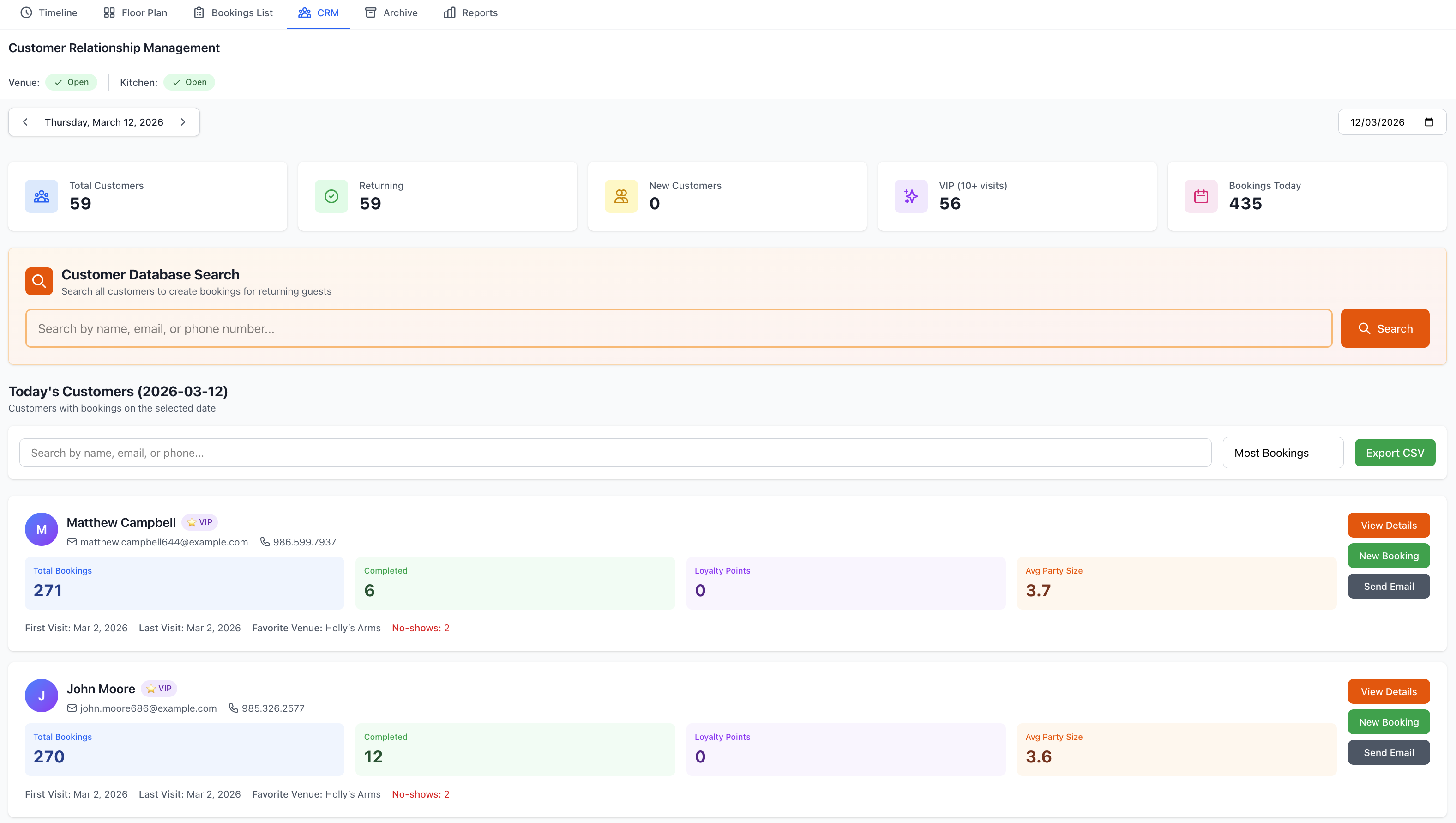
Customer Database
Customer List
View all customers:
Display Columns
- Customer name
- Contact information
- Visit count
- Last visit date
- Total spend
- Customer tags
- VIP status
- Registration date
List Actions
- Search customers
- Filter by criteria
- Sort by any column
- Export data
- Bulk operations
- Create segments
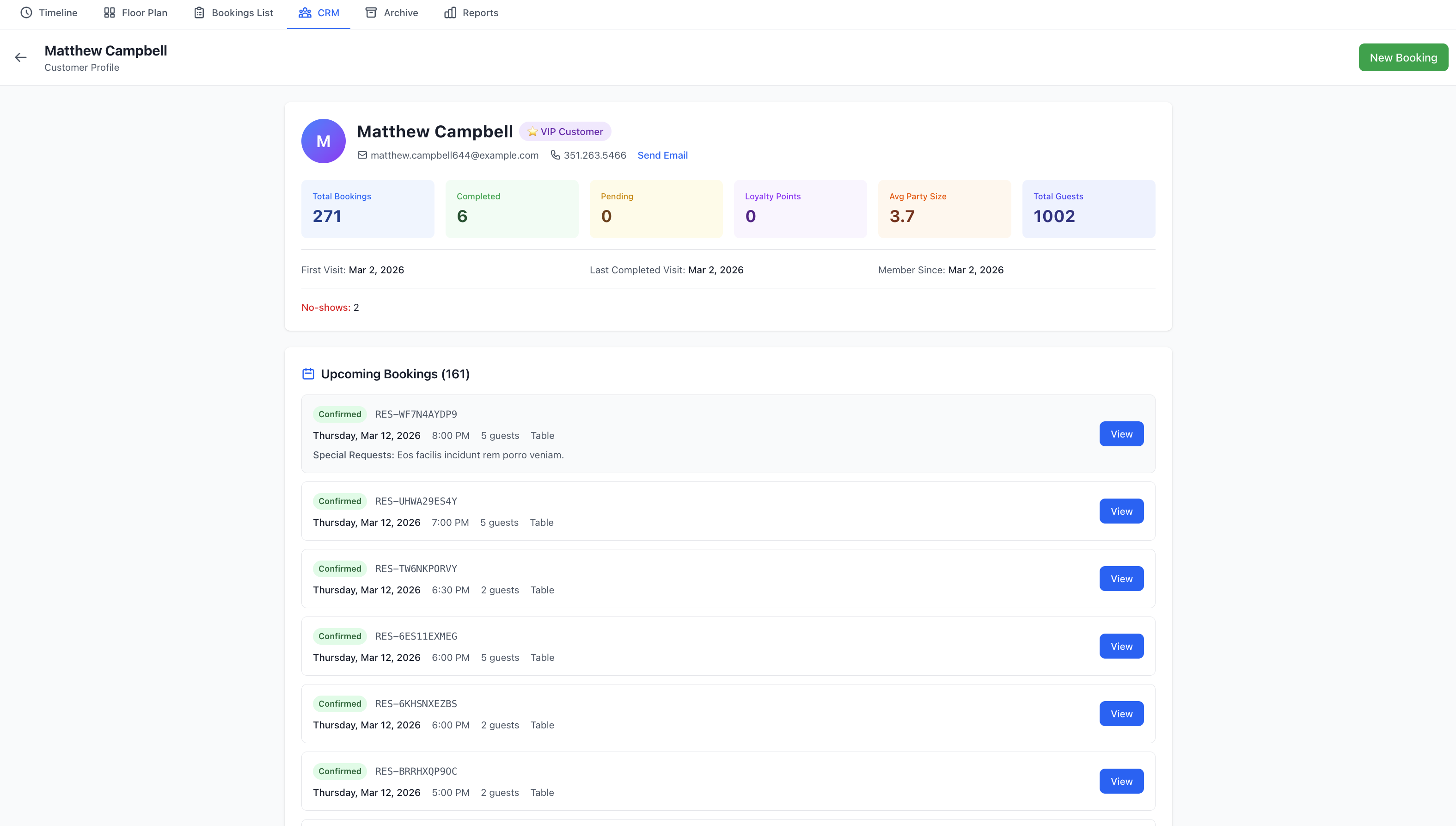
Customer Profile
Click any customer to view:
Personal Information
- Full name
- Email address
- Phone number
- Date of birth
- Address
- Emergency contact
- Profile photo
Visit History
- Number of visits
- Total bookings
- Completed visits
- Cancellations
- No-shows
- Visit frequency
- Favorite days/times
Financial Overview
- Total lifetime spend
- Average spend per visit
- Deposits paid
- Outstanding balance
- Payment history
- Reward points
Preferences & Notes
- Dietary requirements
- Seating preferences
- Favorite tables
- Dish preferences
- Drinks preferences
- Allergen information
- Service notes
- Special occasions
Creating Customer Profiles
Manual Creation
Add customers manually:
- Click Add Customer
- Enter basic information:
- First name
- Last name
- Phone number
- Add additional details
- Set tags/categories
- Save profile
Automatic Creation
Profiles created automatically:
When Booking
- Online booking form
- Phone reservation
- Walk-in registration
- Widget bookings
- API integrations
Data Captured
- Contact details
- Booking information
- Service preferences
- Communication opt-ins
Importing Customers
Bulk import from file:
- Click Import
- Download template
- Fill in customer data
- Upload file
- Map fields
- Review import
- Confirm import
Supported Formats
- Excel (.xlsx)
- CSV (.csv)
- Google Sheets
- vCard
Customer Segmentation
Creating Segments
Group customers:
Segment Types
By Visit Frequency
- New customers (1 visit)
- Occasional (2-5 visits)
- Regular (6-15 visits)
- Frequent (16+ visits)
- VIP (custom threshold)
By Spend
- Budget diners
- Average spend
- High-value
- Top spenders
- By spend range
By Behavior
- Recently active
- Inactive (6+ months)
- At-risk (declining visits)
- Growing engagement
- Loyal customers
By Demographics
- Age groups
- Location
- Birthday month
- Anniversary dates
- Special occasions
By Preferences
- Dietary requirements
- Seating preferences
- Service type
- Meal period
- Cuisine preferences
Using Segments
Marketing Campaigns
- Targeted emails
- SMS campaigns
- Special offers
- Event invitations
- Loyalty rewards
Service Excellence
- Personalized greetings
- Anticipate needs
- Custom recommendations
- Special attention
- Recognition programs
Customer Tags
Tag Management
Organize with tags:
Tag Categories
Status Tags
- VIP
- Regular
- New Customer
- Lapsed
- Blacklisted
Occasion Tags
- Birthday
- Anniversary
- Business dining
- Celebrations
- Date night
Preference Tags
- Vegetarian
- Vegan
- Gluten-free
- Allergies
- Dietary restrictions
Source Tags
- Word of mouth
- Social media
- Google booking
- Walk-in
- Corporate
Custom Tags
- Create your own
- Venue-specific
- Unlimited tags
- Color-coded
- Filterable
Applying Tags
Individual Tagging
- Open customer profile
- Click Add Tag
- Select or create tag
- Save changes
Bulk Tagging
- Select multiple customers
- Click Bulk Actions
- Choose Add Tags
- Select tags
- Apply to all
Communications
Email Marketing
Send targeted emails:
Campaign Types
- Welcome emails
- Birthday wishes
- Special offers
- Event invitations
- Feedback requests
- Newsletter
- Re-engagement
Creating Campaign
- Select customer segment
- Choose email template
- Customize content
- Schedule or send now
- Track results
Email Templates
- Pre-designed templates
- Custom HTML
- Drag-and-drop builder
- Personalization fields
- Mobile-responsive
- Brand styling
SMS Marketing
Text message campaigns:
SMS Uses
- Booking reminders
- Last-minute offers
- Table availability
- Special promotions
- Birthday messages
- Quick surveys
SMS Best Practices
- Keep messages short
- Clear call-to-action
- Timing matters
- Opt-out option
- Comply with regulations
- Track responses
Communication History
Track all interactions:
History Log
- Emails sent
- SMS sent
- Phone calls
- In-person notes
- Feedback received
- Issues resolved
- Preferences updated
Adding Notes
- Open customer profile
- Click Add Note
- Enter information
- Set privacy level
- Save note
VIP Management
Identifying VIPs
Criteria for VIP status:
Automatic Recognition
- Visit frequency threshold
- Total spend amount
- Referrals made
- Review contributions
- Loyalty points
- Custom criteria
Manual Assignment
- Manager designation
- Special relationships
- Influencers
- Corporate accounts
- Local celebrities
VIP Benefits
Special treatment:
Service Excellence
- Priority booking
- Best table assignments
- Personalized service
- Complimentary items
- Special recognition
Communication
- Exclusive offers
- Early event access
- Private events
- Birthday recognition
- Anniversary gifts
Tracking
- VIP dashboard
- Visit patterns
- Spend tracking
- Satisfaction monitoring
- Lifetime value
Loyalty Programs
Points System
Reward repeat visits:
Earning Points
- Points per visit
- Points per dollar spent
- Birthday bonus
- Referral bonuses
- Social media engagement
- Review incentives
Redeeming Points
- Discount on bill
- Free items
- Exclusive experiences
- Event tickets
- Gift vouchers
Reward Tiers
Level-based benefits:
Bronze Tier
- Basic rewards
- Standard recognition
- Email communications
Silver Tier
- Enhanced rewards
- Priority waitlist
- Special offers
- Birthday treat
Gold Tier
- Premium rewards
- Priority booking
- VIP treatment
- Exclusive events
- Dedicated service
Platinum Tier
- Maximum benefits
- Personal concierge
- Unlimited priority
- Exclusive access
- Special gifts
Analytics & Insights
Customer Analytics
Track key metrics:
Visit Metrics
- New customers
- Returning customers
- Visit frequency
- Return rate
- Customer lifetime
Financial Metrics
- Average spend
- Lifetime value
- Revenue per customer
- Spend trends
- Top spenders
Engagement Metrics
- Email open rates
- SMS response rates
- Booking sources
- Referral conversion
- Review participation
Reports
Generate customer reports:
Standard Reports
- Customer list
- Visit history
- Spend analysis
- Birthday list
- Inactive customers
- VIP roster
- Tag reports
- Segment analysis
Custom Reports
- Choose metrics
- Select date range
- Apply filters
- Generate report
- Export data
Integration
External Systems
Connect with other tools:
Email Platforms
- Mailchimp
- Constant Contact
- SendGrid
- Custom SMTP
Marketing Tools
- Google Analytics
- Facebook Pixel
- Marketing automation
- Social media
POS Systems
- Sales data import
- Spend tracking
- Payment history
- Receipt integration
Privacy & Compliance
Data Protection
GDPR compliance:
Customer Rights
- Access their data
- Correct information
- Delete profile
- Export data
- Opt-out communications
- Withdraw consent
Data Security
- Encrypted storage
- Access controls
- Audit logging
- Regular backups
- Secure deletion
Consent Management
Track permissions:
Consent Types
- Marketing emails
- SMS messages
- Data storage
- Third-party sharing
- Automated profiling
Managing Consent
- Capture at registration
- Update anytime
- Respect preferences
- Document consent
- Easy opt-out
Best Practices
Building Relationships
- Personalization - Use names and preferences
- Recognition - Acknowledge repeat visits
- Attention - Remember details
- Communication - Stay in touch
- Appreciation - Thank loyal customers
Data Quality
- Accuracy - Keep information current
- Completeness - Fill in details
- Deduplication - Merge duplicates
- Verification - Confirm details
- Regular Cleanup - Remove old data
Effective Marketing
- Segmentation - Target specific groups
- Relevance - Appropriate messages
- Timing - Right moment
- Value - Provide benefits
- Testing - A/B test campaigns
Troubleshooting
Duplicate Profiles
Managing duplicates:
- Search for potential duplicates
- Review both profiles
- Select profiles to merge
- Choose primary profile
- Merge data
- Verify result
Missing Data
If information incomplete:
- Request updates during booking
- Send profile update email
- Capture during visit
- Offer incentive for completion
- Import from other sources
Communication Issues
Email/SMS not working:
- Verify contact details
- Check consent status
- Review spam reports
- Test email delivery
- Check SMS credits
- Review bounce rate
Support
Need help with CRM?
- Email: [email protected]
- WhatsApp: WhatsApp Support
Related Pages
- Bookings List - View reservations
- Reports - Detailed analytics
- New Booking - Create bookings
Customer Retention
Acquiring a new customer costs 5-7x more than retaining an existing one. Use CRM to build loyalty and drive repeat business.