
Appearance
Manage Rotas
Create, configure, and optimize staff schedules.
Overview
Manage Rotas provides comprehensive tools for creating and managing staff schedules. Set up recurring patterns, handle special requirements, manage labor budgets, and ensure optimal coverage.
Accessing Manage Rotas
Navigate to Rotas & Staff > Manage Rotas
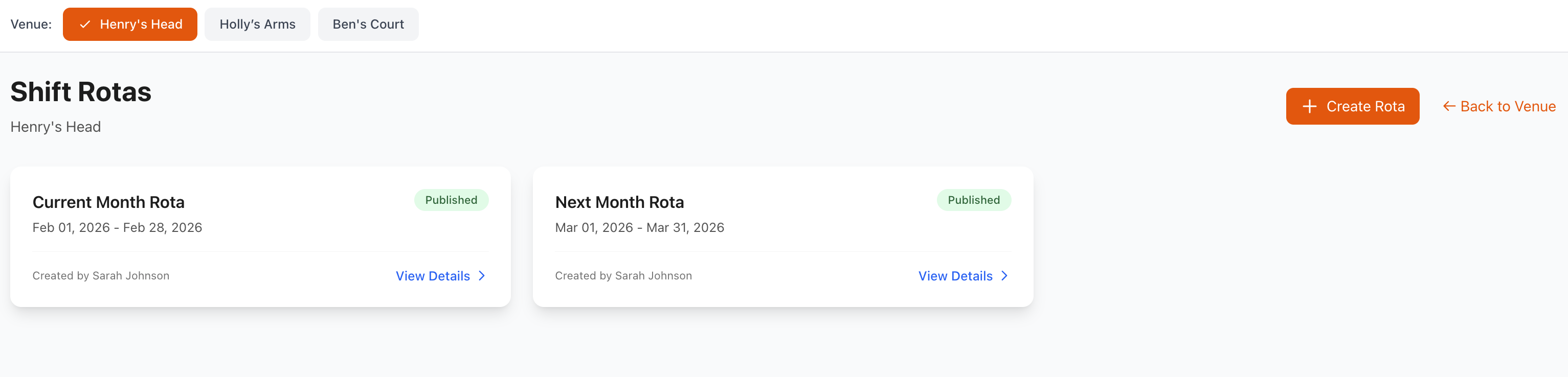
Creating New Rotas
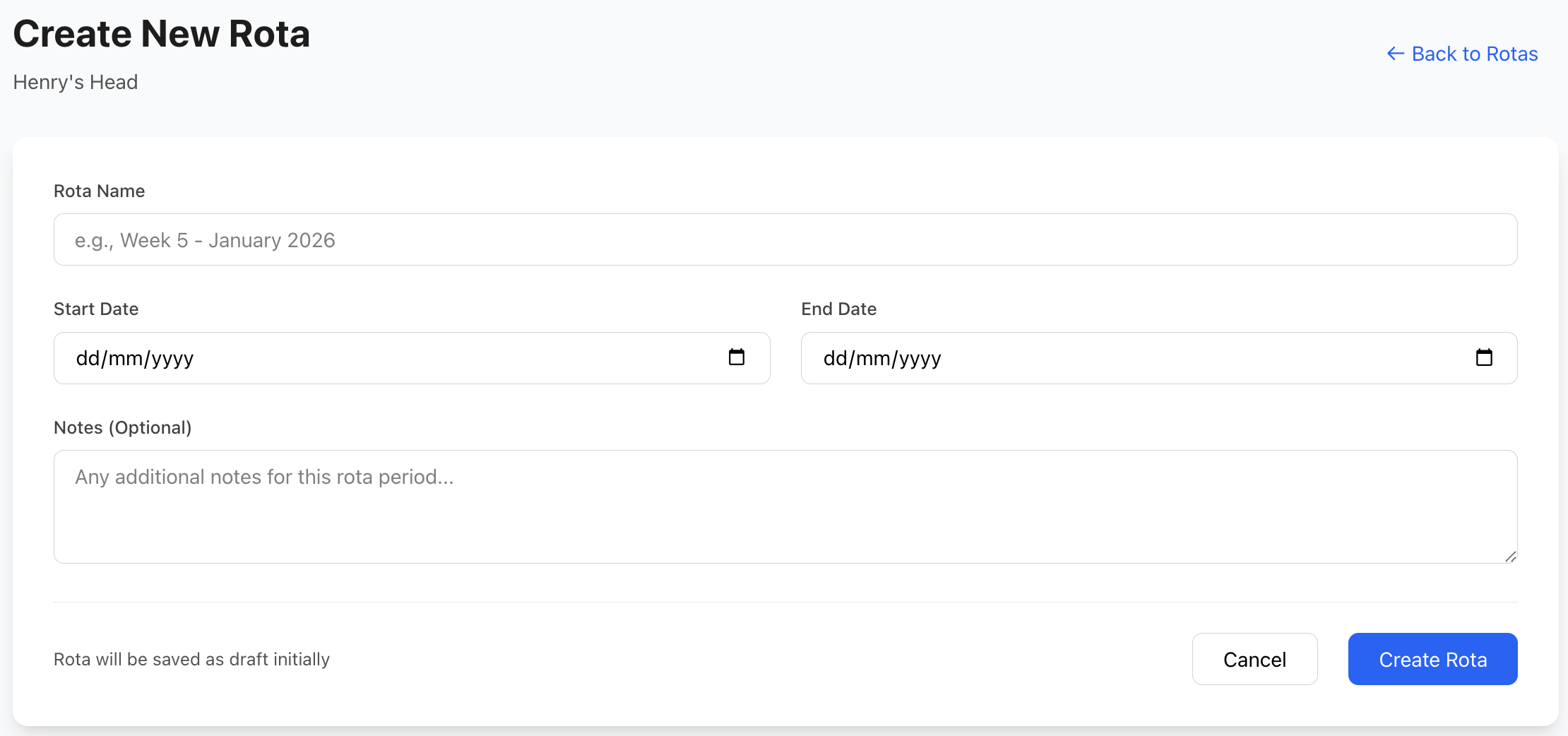
Quick Create
Fast rota setup:
- Click Create Rota or +
- Select date range
- Choose venue
- Name your rota (optional)
- Save to begin scheduling
Rota Types
Standard Rota
- Regular weekly schedule
- Typical staffing pattern
- Predictable needs
- Most common type
Event Rota
- Special event coverage
- One-time occurrence
- Specific requirements
- Extra staff needs
Seasonal Rota
- Busy/quiet periods
- Holiday schedules
- Summer/winter changes
- Adjusted staffing levels
Emergency Cover
- Unplanned absences
- Last-minute needs
- Fill-in scheduling
- Urgent coverage
Rota Configuration
Basic Settings
Configure rota parameters:
Date Range
- Start date
- End date
- Duration
- Recurring pattern (optional)
Venue Assignment
- Single location
- Multiple venues
- All venues
- Venue groups
Status
- Draft (work in progress)
- Published (released to staff)
- Archived (historical)
- Template (reusable pattern)
Advanced Settings
Shift Rules
- Minimum rest between shifts
- Maximum consecutive days
- Overtime thresholds
- Break requirements
- Labor law compliance
Budget Settings
- Total labor budget
- Budget per day/week
- Cost alerts
- Spending limits
- Approval thresholds
Notification Settings
- Auto-notify staff
- Reminder schedule
- Change notifications
- Request alerts
- Escalation rules
Auto-Scheduling
Intelligent Assignment
Automated shift allocation:
How It Works
- Define requirements (roles, hours, coverage)
- System analyzes staff availability
- Considers qualifications and experience
- Balances workload fairly
- Optimizes for cost
- Generates draft schedule
- Review and adjust
- Publish to staff
Optimization Factors
- Staff availability
- Role qualifications
- Experience levels
- Hour preferences (full-time/part-time)
- Previous shift patterns
- Labor costs
- Rest period compliance
- Fair distribution
Auto-Scheduling Settings
Configure automation:
Preferences
- Prioritize cost savings
- Prioritize staff preferences
- Balance both
- Minimum experience requirements
- Maximum hours per person
Constraints
- Cannot exceed budget
- Must respect availability
- Ensure role coverage
- Minimum staff levels
- Maximum shift length
Rules
- Rotate unpopular shifts
- Distribute weekends fairly
- Balance day/night shifts
- Avoid favorites
- Fair overtime distribution
Manual Scheduling
Building Schedules Manually
Step-by-step creation:
1. Define Requirements
- How many staff per shift
- Required roles
- Skill levels needed
- Peak/off-peak coverage
2. Review Availability
- Staff availability status
- Time-off requests
- Existing commitments
- Preferences noted
3. Assign Shifts
- Drag and drop (timeline view)
- Select and assign (list view)
- Use templates
- Copy previous week
4. Check Coverage
- Verify all shifts filled
- Confirm role coverage
- Check experience balance
- Review costs
5. Resolve Conflicts
- Address warnings
- Fix overlaps
- Check compliance
- Adjust as needed
6. Publish Schedule
- Final review
- Publish to staff
- Send notifications
- Monitor responses
Templates & Patterns
Using Shift Templates
Apply predefined patterns:
Template Types
- Daily templates
- Weekly templates
- Monthly templates
- Event templates
Applying Templates
- Select date range
- Choose template
- Preview application
- Adjust if needed
- Apply to schedule
See Shift Templates for more details.
Copying Previous Rotas
Reuse successful schedules:
Copy Last Week
- Select current week
- Click Copy From
- Choose previous week
- Paste to current
- Adjust changes
Copy Pattern
- Identify pattern to copy
- Select source dates
- Choose destination
- Map changes (if needed)
- Apply pattern
Coverage Requirements
Setting Requirements
Define minimum staffing:
By Time Period
- Hourly requirements
- Service period needs
- Peak vs. off-peak
- Different day requirements
By Role
- Number of managers
- Chef coverage
- Server quantities
- Bartender needs
- Host requirements
By Venue
- Location-specific
- Size considerations
- Event requirements
- Operating hours
Coverage Dashboard
Visual overview:
Metrics Displayed
- Required vs. scheduled
- Coverage percentage
- Under-staffed periods
- Over-staffed periods
- Cost implications
Color Coding
- Red: Under minimum
- Amber: At minimum
- Green: Optimal
- Blue: Over-staffed
Budget Management
Setting Budgets
Define spending limits:
Budget Types
- Weekly labor budget
- Monthly labor budget
- Per-shift budget
- Department budgets
- Venue budgets
Budget Parameters
- Maximum spend
- Target spend (ideal)
- Minimum spend
- Alert thresholds
- Approval requirements
Cost Tracking
Monitor spending:
Real-Time Costs
- Total scheduled cost
- Cost per day
- Cost per shift
- Department breakdown
- Venue breakdown
Comparison Metrics
- Budget vs. actual
- Percentage used
- Remaining budget
- Projected overage
- Historical comparison
Cost Optimization
- Identify expensive shifts
- Suggest alternatives
- Reduce overlaps
- Rebalance coverage
- Swap high/low cost staff
Overtime Management
Control overtime costs:
Overtime Rules
- Hours threshold (e.g., 40/week)
- Overtime multiplier (1.5x, 2x)
- Approval requirements
- Advance warnings
- Maximum limits
Alerts
- Approaching overtime
- Overtime scheduled
- Excessive hours
- Budget impact
- Alternative suggestions
Shift Swaps & Changes
Swap Requests
Handle staff swap requests:
Approval Workflow
- Staff requests swap
- Finds replacement
- Manager reviews
- Checks qualifications
- Approves/denies
- Updates schedule
- Notifies both parties
Smart Approval
- Auto-approve matching qualifications
- Auto-approve similar experience
- Require approval for junior replacements
- Block if coverage affected
Emergency Changes
Last-minute adjustments:
Common Scenarios
- Staff calls in sick
- Unexpected absence
- Emergency coverage needed
- Event cancelled/added
- Weather closures
Quick Response
- Identify coverage gap
- Check available staff
- Send emergency request
- First to respond gets shift
- Update schedule
- Confirm coverage
Publishing & Communication
Publishing Schedules
Release to staff:
Pre-Publish Checks
- All shifts assigned
- No critical conflicts
- Budget compliance
- Coverage adequate
- Staff availability respected
Publishing
- Review draft schedule
- Run conflict check
- Click Publish
- Select notification method
- Publish immediately or schedule
- Staff receive notifications
Post-Publish
- Monitor confirmations
- Handle questions
- Address issues
- Track acceptance
- Lock schedule (optional)
Communication Tools
Bulk Messaging
- Message all staff
- Message specific teams
- Message by venue
- Custom recipient selection
Announcement Types
- Schedule published
- Changes made
- Coverage needed
- Important updates
- General announcements
Message Channels
- SMS/text
- Push notifications
- In-app messages
- All channels
Compliance & Labor Laws
Legal Compliance
Ensure regulatory adherence:
Working Hours
- Maximum daily hours
- Maximum weekly hours
- Minimum rest periods
- Break entitlements
- Young worker restrictions
Rest Periods
- Between shifts (11+ hours typical)
- Weekly rest day
- Consecutive days worked
- Night shift rules
- Fatigue management
Record Keeping
- Shift records
- Hours worked
- Break times
- Overtime records
- Compliance reports
Compliance Warnings
Automatic alerts for:
- Excessive hours scheduled
- Insufficient rest periods
- Missing required breaks
- Consecutive day violations
- Minor working violations
- Overtime limits exceeded
Configure rules in Settings > Labor Law Compliance
Reporting & Analytics
Schedule Reports
Generate comprehensive reports:
Standard Reports
- Weekly schedule summary
- Monthly overview
- Labor cost analysis
- Coverage report
- Overtime report
- Staff hours summary
- Department breakdown
Custom Reports
- Choose parameters
- Select metrics
- Configure layout
- Generate report
- Export/print
Performance Metrics
Track scheduling effectiveness:
Efficiency Metrics
- Labor cost percentage
- Revenue per labor hour
- Staff productivity
- Coverage efficiency
- Schedule utilization
Quality Metrics
- Attendance rates
- On-time percentage
- Shift completion rate
- Swap request frequency
- Staff satisfaction
Planning Metrics
- Advance scheduling
- Template usage
- Auto-schedule success
- Budget adherence
- Compliance rate
Multi-Venue Operations
Managing Multiple Venues
Coordinate across locations:
Venue Groups
- Create venue groups
- Shared staff pools
- Consistent scheduling
- Cross-venue coverage
Cross-Location Shifts
- Staff work multiple venues
- Travel time considerations
- Location-based rates
- Expense tracking
- Mileage tracking
Consolidated Views
- All venue overview
- Compare locations
- Transfer staff
- Balance resources
- Total labor costs
Best Practices
Effective Rota Management
- Plan Ahead - Schedule 2-4 weeks in advance
- Be Consistent - Predictable patterns help staff
- Fair Distribution - Rotate undesirable shifts
- Stay Within Budget - Monitor costs constantly
- Communicate Clearly - Early, often, and transparently
Optimization Strategies
- Peak Staffing - More staff during busy periods
- Off-Peak Reduction - Minimize staff during quiet times
- Skill Mix - Balance experienced and junior staff
- Flexibility - Build in buffer for changes
- Staff Input - Consider preferences when possible
Scheduling for Success
- Right People - Match skills to requirements
- Right Time - Schedule based on demand
- Right Cost - Stay within budget
- Right Balance - Fair workload distribution
- Right Communication - Keep everyone informed
Troubleshooting
Common Issues
Can't Publish Schedule
- Check for conflicts
- Resolve warnings
- Ensure all shifts assigned
- Verify permissions
- Check system status
Auto-Schedule Not Working
- Review requirements
- Check staff availability
- Verify qualifications
- Adjust constraints
- Try manual override
Budget Keeps Exceeding
- Review hourly rates
- Reduce overlap periods
- Use part-time staff
- Adjust coverage levels
- Optimize shift lengths
Staff Not Receiving Notifications
- Verify email/phone numbers
- Check notification settings
- Test notification system
- Review spam folders
- Check app permissions
Support
Need help with Manage Rotas?
- Email: [email protected]
- WhatsApp: WhatsApp Support
Related Pages
- Rota Timeline - Visual schedule view
- Rota List - Detailed list view
- Staff - Staff management
- Shift Templates - Reusable templates
Auto-Scheduling
Use auto-scheduling for baseline coverage, then manually adjust for optimization. This saves time while maintaining control.